AI is writing more code. At one company I worked at, our engineering OKRs included a specific KR to increase engineering velocity by 15% or more through AI tooling adoption — measured by cycle time — and a separate KR targeting 25% faster PRD cycles. Those weren’t stretch goals. They were what our teams were being held to.
The bottleneck has shifted. Getting code written isn’t the hard part anymore. Getting it designed, reviewed, understood, and safely deployed is.
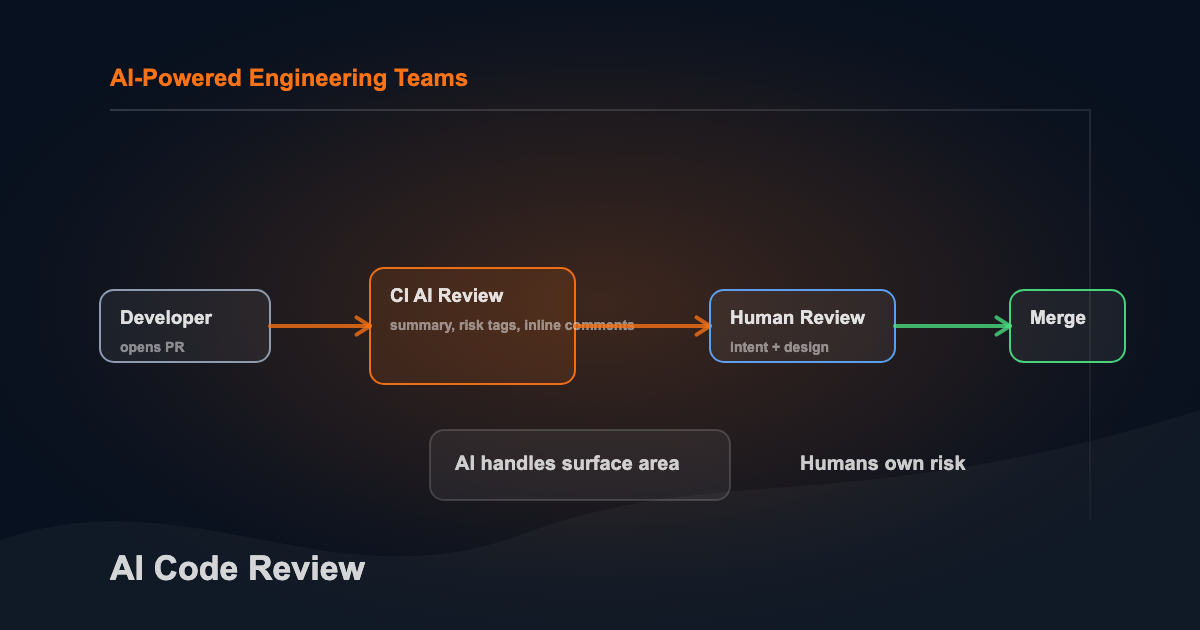
The natural response is to accelerate the review side the same way you accelerated the creation side: bring AI in. But the goal isn’t to have AI rubber-stamp what AI wrote. It’s to redirect human attention. Less time on syntax and surface patterns. More time on planning, intent, and architecture decisions that actually determine whether the thing you’re building is the right thing.
That’s the frame for this article. AI code review works when it frees reviewers to operate at the level where human judgment is irreplaceable.
A Quick Glossary
| Term | What it means |
|---|---|
| Pull request (PR) | A proposed code change that others review before merging |
| Diff | The specific lines added, removed, or changed in a PR |
| CI (continuous integration) | Automated checks that run on every PR |
| Gating | Rules that block merging until checks pass |
| False positive | The tool flags something that isn’t actually a problem |
| False negative | The tool misses a real problem |
A high false positive rate trains developers to ignore the tool. That’s the failure mode worth designing against.
Three Approaches to AI Code Review
AI code review isn’t one thing. There are three distinct approaches, each with different tradeoffs. Most teams end up using a combination.
Approach 1: Local AI Reviewer (Skill or Sub-Agent)
The simplest entry point. You’re using Claude Code or a similar agentic tool, and you invoke a review agent directly.
This is what I do on my own projects. The agent is defined once as a markdown file with a YAML frontmatter header that Claude Code reads at startup. Here’s what that definition looks like:
---
name: code-reviewer
description: "Expert code reviewer for security, performance, and quality audits. Use when the user asks to review code, check for security issues, audit a codebase, or after significant code changes."
tools: Read, Glob, Grep, Bash
disallowedTools: Write, Edit
model: opus
maxTurns: 15
memory: user
---
disallowedTools: Write, Edit means the reviewer can never touch the code — read-only by definition, not by convention. model: opus routes it to the most capable model specifically for this task while other agents in the same session can run on faster, cheaper models. memory: user means it carries learnings about your codebase across sessions — coding patterns, recurring antipatterns, architectural decisions — without you having to re-explain the codebase every time.
The agent session that wrote the code tends to be biased toward its own decisions, so I invoke a separate agent to check. That separation matters more than it sounds.
What invoking it looks like in practice:
# Review all staged changes before opening a PR
/code-reviewer

# Or ask about a specific concern
"Review src/api/auth.py for SQL injection and auth bypass risks"
The agent reads the relevant files, checks git diff for what changed, runs its analysis across security, performance, code quality, and best practices, and produces a prioritized report with file:line references for every finding. You address what makes sense, ignore what doesn’t, then open the PR.
The advantage is flexibility — the review runs against whatever context you give it, no latency waiting for CI, no configuration files to maintain. The limitation is that it’s on-demand. It only runs when you invoke it. For solo projects, that’s fine. For teams, you want automation.
When to use it: Personal projects, reviewing AI-generated code before you commit, pre-PR sanity checks, or any context where you want a second opinion from a fresh agent that didn’t write the code.
Approach 2: CI/CD Pipeline Integration
This is the most common enterprise pattern. An AI reviewer runs automatically on every PR as part of your existing CI pipeline. It posts comments, adds labels, and optionally gates merge based on findings.
The flow:
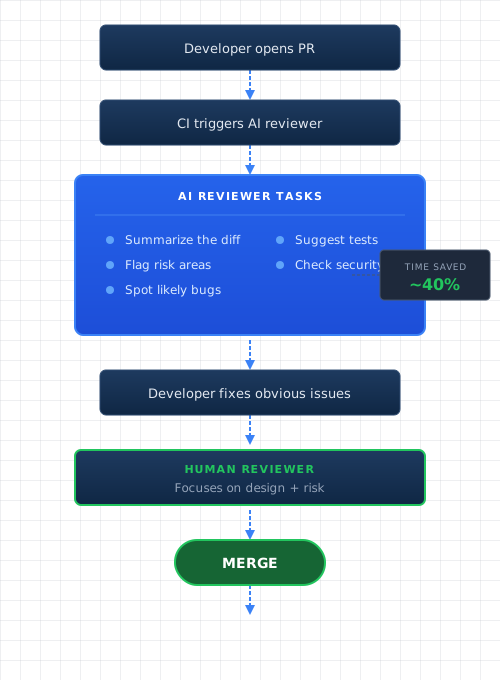
Developer opens a PR. CI triggers within seconds. The AI reviewer reads the diff, generates structured findings, and posts them as PR comments — same interface as human review. The author addresses what makes sense before a human reviewer looks at the diff. Human reviewers see a cleaner starting point and can spend time on intent and design instead of catching obvious issues.
Here’s a rough model. Say AI catches 40% of the surface-level comments that would otherwise come from humans, and each review round-trip costs 4 hours of calendar time across context switches. That’s 1.6 hours saved per PR. A team pushing 50 PRs a week gets 80 engineering hours back. The inputs are illustrative but the direction holds.
You control everything: which model, what the reviewer checks, how findings are formatted, whether any findings block merge. The setup cost is higher than the local approach — expect 2-4 hours for a working MVP — but the consistency payoff is significant. Every PR gets the same baseline review regardless of reviewer availability or fatigue.
When to use it: Teams with shared codebases, any context where review consistency matters, or when you want automated enforcement of specific rules (security checks, required test patterns).
Approach 3: Vendor Tools
You don’t have to build anything. The commercial tooling has matured significantly. Here’s what’s available.
CodeRabbit
A popular dedicated AI code review tool. CodeRabbit integrates directly with GitHub and GitLab repositories and posts inline PR comments automatically. It provides a PR summary, identifies potential issues, suggests improvements, and learns from your codebase patterns over time.
The configuration lives in a .coderabbit.yaml file in your repo. You can tune review focus, set ignore patterns, and customize how findings are reported. The tool tracks what developers accept vs. dismiss and improves signal quality accordingly.
Best fit: teams who want automated PR review with minimal setup and some ability to customize review behavior.
Greptile
Greptile takes a different angle than most AI review tools. Instead of reviewing just the diff in isolation, it indexes your entire codebase and understands it as a whole. When reviewing a PR, it can answer questions like “does this change break the contract that other services expect?” or “is there already a utility that does what this new function does?”
That codebase-awareness changes what AI review can catch. It’s not just “is this code correct in isolation” — it’s “does this fit the system correctly.” For larger codebases where reviewers can’t hold the whole thing in their head, that’s meaningful signal.
Best fit: larger codebases where cross-file and cross-service awareness matters, teams dealing with consistency problems across a growing codebase.
GitHub Copilot Code Review
GitHub rolled out Copilot’s AI reviewer as a native PR feature. Add “Copilot” as a reviewer alongside humans. It posts inline comments in the PR interface — same UX as a human review. Zero CI configuration, zero prompt writing, zero infrastructure. Available on supported Copilot plans — check GitHub’s current plan docs, as Copilot tiers have been restructured.
The tradeoff is control. You can’t customize the review focus, inject team-specific rules, or tune signal vs. noise at the prompt level. It’s a product, not a platform.
Best fit: teams already on a Copilot plan who want a quick AI review baseline with no setup overhead.
GitLab Duo
GitLab’s Duo Code Review sits inside merge requests and offers similar inline comment behavior. The differentiator is GitLab’s tighter integration between code review, CI pipelines, and issue tracking — findings can potentially surface alongside related issues rather than living only in the MR thread. Review policies can be enforced at the project level.
Best fit: GitLab-native teams who want AI review without adding another vendor.
Bitbucket / Atlassian Intelligence
Atlassian has been rolling out AI across their product suite. For Bitbucket, Atlassian Intelligence can assist with PR descriptions, summarize changes, and surface potential issues. Atlassian Intelligence for code review is newer and still catching up to the more established options as of early 2026, but it’s improving and it’s already in the platform if you’re running Bitbucket Cloud.
Best fit: teams already deep in the Atlassian ecosystem (Jira + Confluence + Bitbucket) who want AI review without a new vendor relationship.
Picking an approach
| Need | Approach |
|---|---|
| Personal project, on-demand review | Local skill / Claude Code |
| Full control, custom rules, gating | DIY CI/CD integration |
| Fast start, GitHub-native | GitHub Copilot Code Review |
| GitLab-native | GitLab Duo |
| Codebase-aware review (cross-file context) | Greptile |
| Automated inline PR comments with some customization | CodeRabbit |
| Atlassian shop | Bitbucket / Atlassian Intelligence |
| Compliance / no third-party data sharing | Self-hosted DIY |
Four Trends Worth Tracking
The Pre-Review Shift
AI feedback before humans look is the highest-leverage placement. The old flow: developer opens PR, waits for reviewer, gets 15 comments, fixes them, waits again. The new flow: developer opens PR, CI runs AI review in 90 seconds, developer fixes 6 issues, human reviewer sees a cleaner diff.
Every issue caught before human review saves two context switches — one for the author receiving the comment, one for the reviewer writing it.
The Syntax-to-Intent Shift
When AI handles surface-level findings, reviewers have bandwidth for the questions that matter.
Surface-level (AI handles well): missing null checks, inconsistent naming, no test for this branch, logging format violations.
Intent-level (humans are better): does this match the actual requirement, will this behave correctly under load, are failures observable in production, does this respect system boundaries.
AI absorbs the category of work that burns reviewer attention without requiring reviewer judgment. That’s the real payoff.
Prompts as Production Code
Mature teams treat their AI review prompts like code. They version them. They review changes. They test against sample diffs before deploying to the full PR queue.
A strong policy prompt encodes:
- Secure coding rules
- Logging and telemetry expectations
- Error handling conventions
- Performance constraints
- Testing minimums for risky areas
This creates consistency — every PR gets the same baseline review regardless of which human looks at it.
Integration Beats Model
Teams stick with AI review when it fits their workflow. The model matters less than the integration. What determines adoption: does it run reliably in CI, is latency predictable, are findings high signal, does it cite specific lines, can you filter and track findings. A messy integration with a great model fails faster than a clean integration with a good model.
Building Your Own CI/CD Reviewer
If you’re going the DIY route, here’s the blueprint.
Step 1: Write the reviewer’s job description
Pick one or two tasks. Keep scope tight.
Good starter jobs:
- Summarize the PR in 5 sentences
- List the top 5 risk areas with reasons
- Suggest missing tests with concrete cases
“Review this code for any issues” is too vague. The narrower the job, the easier it is to measure quality and improve.
Step 2: Pick your gating level
Teams that deploy broad AI review on day one generate noise and lose trust. Phase it.
| Level | What happens | When to use |
|---|---|---|
| Advisory | AI posts a report, humans decide | Starting out, building trust |
| Soft gate | AI adds a label like needs-attention | Established teams, high-risk PRs |
| Hard gate | AI blocks merge for specific rules | Only for narrow, high-signal checks |
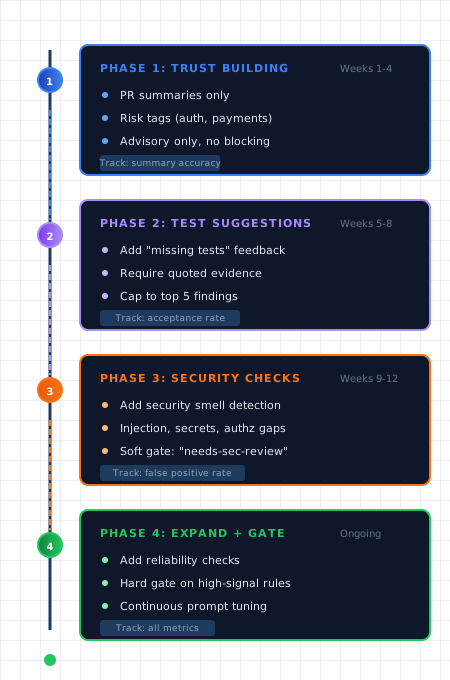
Start advisory. In my experience, 50 PRs gives you enough signal to know whether the tool is earning trust — if developers are accepting more than 80% of findings, it’s ready for soft gates. Move to hard gates only for deterministic rules (secrets detected, missing required file). Hard gates with high false positive rates get routed around fast.
Step 3: Control context
AI output quality follows input quality.
Good inputs: PR title and description, full diff with file paths, short excerpt from your coding standards, risk hints (“touches auth”, “adds migration”).
Skip: Entire repository, full file contents when the diff is enough, historical context that doesn’t affect this change. Frontier models can ingest a small codebase in a single context window now, but sending everything dilutes findings. The diff plus relevant snippets almost always outperforms the full repo dump.
Step 4: Require structured output with evidence
If a finding can’t quote evidence from the diff, set confidence to “low” and consider filtering it out. Structured output lets you build automation: filter by severity, track acceptance rates by finding type, identify prompts that need tuning. The schema in the policy prompt below is the reference — every finding needs title, severity, file, line_range, evidence, recommendation, and confidence.
Step 5: Cap output volume
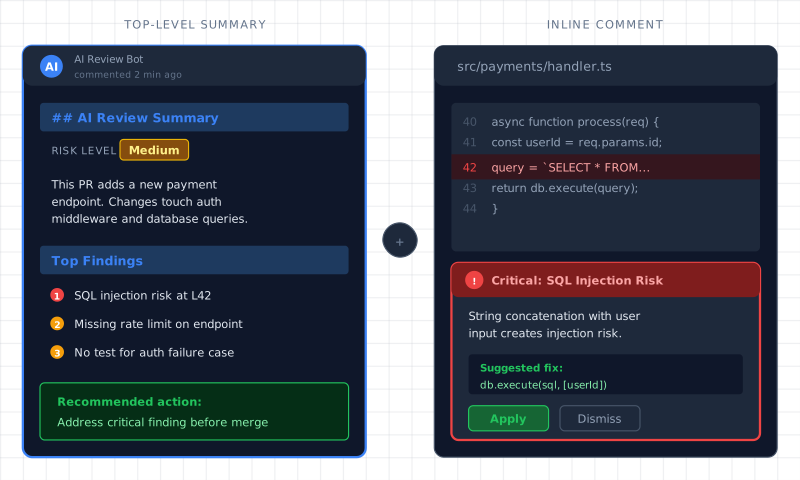
Cap to 8 findings per PR. Force the AI to prioritize. One focused summary comment beats 20 scattered inline notes. Humans can process 8. They can’t process 30.
A Reusable Policy Prompt
You are a senior code reviewer for our team.

Input: a pull request title, description, and git diff.
Goal: help humans review faster and catch risky issues.

Review focus:
1) Correctness: edge cases, null handling, boundary conditions
2) Security: authz checks, injection risks, secrets, PII handling
3) Reliability: timeouts, retries, cleanup, concurrency
4) Tests: missing cases tied to this change
5) Maintainability: complexity, duplication

Rules:
- Only comment on code shown in the diff.
- For each finding, quote evidence from the diff.
- If you're unsure, set confidence to low.
- Limit to the 8 highest impact findings.
- Include a concrete recommendation and suggested fix.

Output valid JSON:
{
  "summary": "string",
  "risk_level": "low | medium | high",
  "findings": [{
    "title": "string",
    "severity": "info | warn | critical",
    "file": "string",
    "line_range": "string",
    "evidence": "quoted from diff",
    "recommendation": "string",
    "confidence": "low | medium | high"
  }]
}
Validate Before Posting
import json

REQUIRED_TOP = {"summary", "risk_level", "findings"}
REQUIRED_FINDING = {
    "title", "severity", "file", "line_range",
    "evidence", "recommendation", "confidence"
}

def validate_review(payload: dict) -> None:
    missing = REQUIRED_TOP - payload.keys()
    if missing:
        raise ValueError(f"Missing fields: {sorted(missing)}")

    if payload["risk_level"] not in {"low", "medium", "high"}:
        raise ValueError("risk_level must be low, medium, or high")

    for i, finding in enumerate(payload["findings"]):
        missing_f = REQUIRED_FINDING - finding.keys()
        if missing_f:
            raise ValueError(f"finding[{i}] missing: {sorted(missing_f)}")

def parse_ai_output(text: str) -> dict:
    payload = json.loads(text)
    validate_review(payload)
    return payload
Log every review. Measure quality over time. Identify which finding types get accepted vs. dismissed.
Best Practices That Hold
Make AI cite evidence. Quote exact lines from the diff. Link to internal standards when relevant. If a finding doesn’t cite evidence, it’s opinion. Developers ignore opinions from bots.
Require a fix, not just a warning. “You might have a null pointer issue” creates work. “Add this null check here” removes work. The most useful AI findings include a concrete patch or code suggestion. Track how often developers apply vs. dismiss suggestions — that ratio tells you whether your prompt is producing signal or noise.
Start narrow, expand later. Summaries and risk tags first. Test suggestions second. Security checks for PRs that touch endpoints. Reliability checks for IO and concurrency changes. After each phase, review false positives, tune prompts, expand only when signal is strong.
Secure the data path. PRs contain proprietary logic. Controls that hold up: redact secrets before sending context, restrict AI review on external forks, log what was sent with access controls, define retention policies for prompts and outputs, involve security and legal early for vendor tools.
Keep ownership clear.
| Role | Owns |
|---|---|
| Author | Final change and tests |
| Reviewer | Approval decision |
| Team | Prompt and policy lifecycle |
AI suggests. Humans own. This prevents “the tool said so” arguments.
Measure outcomes that matter.
| Metric | What it tells you |
|---|---|
| Time from PR open to merge | Is review faster? |
| Review iterations per PR | Fewer round-trips? |
| Post-merge defect rate | Is quality holding? |
| AI finding acceptance rate | Is output useful? |
| Top dismissed finding types | What needs prompt tuning? |
Start Here
Pick the approach that matches your current context:
- Solo / personal project: Set up a Claude Code review skill. Invoke it before every PR. Takes 30 minutes.
- Small team, GitHub: Start with CodeRabbit or GitHub Copilot review. Zero configuration, immediate feedback.
- Larger team, custom rules: Build the CI/CD integration. Use the policy prompt above. Start advisory, measure for 50 PRs, then decide on gating.
- Codebase consistency problems: Evaluate Greptile for the cross-file awareness. The standard diff-only tools miss a whole category of issues it catches.
The goal stays the same across all three: human reviewers spending their attention on intent, design, and production risk — not formatting and missing null checks. AI handles the surface. You handle what actually matters.