Every automation article talks about “enterprise digital transformation” and seven-figure budgets. Great if you’re running a 500-person company, but useless if you have 6 employees and a real business to run. Here’s what automation actually costs at your scale.
The three tiers of small business automation
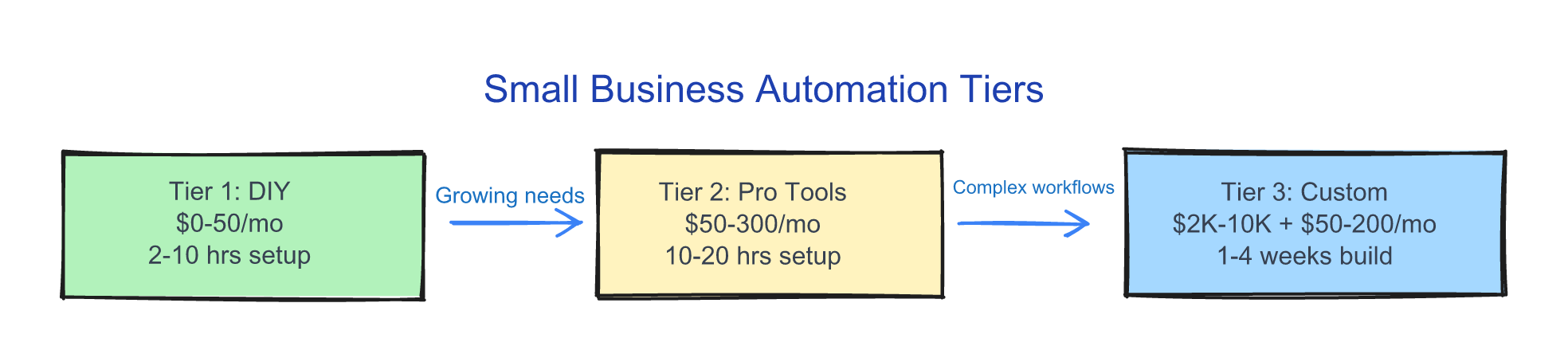
Not all automation costs the same, and most small businesses should start at Tier 1 or 2 before they ever think about Tier 3.
Tier 1: Free to $50/month — DIY with existing tools
You’re already paying for tools that have automation built in, and most of them have features you’ve never turned on. Invoice reminders that send themselves, CRM contacts added to your email list automatically, Slack notifications when a form comes in — none of this requires new software, just clicking the settings you’ve been ignoring. Zapier’s free tier gives you 5 automations and 100 tasks/month, Make.com has a free tier too, and most of the SaaS tools you already pay for have native integrations sitting there unused.
The trade-off is your time: 1-4 hours per automation for setup and troubleshooting. For simple workflows, that’s a good deal every time. Figure $0-50/month plus 2-10 hours upfront.
Tier 2: $50-300/month — serious automation
This is where automation starts replacing real chunks of manual work — multiple tools connected, conditional logic, workflows that would take a person hours running in seconds. Think full client onboarding sequences, automated reporting across multiple data sources, or lead scoring that routes hot leads to you immediately and nurtures cold ones on autopilot. The kind of work that eats 5-10 hours a week when done by hand.
You’ve got options: Zapier Pro ($20-70/month), Make.com Pro ($9-16/month), or n8n self-hosted (free tool, $5-20/month for the server). n8n is worth a look if you want unlimited automations without per-task pricing. More setup time though (4-8 hours per workflow) and you’ll hit edge cases — what happens when the API goes down, what if a client doesn’t have an email address. Budget for occasional maintenance, and figure $50-300/month total with typically 10-20 hours of setup for a full suite.
Tier 3: $2,000-10,000 one-time + $50-200/month — custom-built
You hire someone to build automations designed for how your business actually works — not templates, but something built around your specific tools and processes. A complete client lifecycle system: first contact to signed contract to onboarding to delivery to invoicing to review request, all automated and connected. Same underlying platforms (n8n, Make, custom code) but built by someone who’s done this before, and the value is in the architecture, the error handling, the edge cases you’d never think of.
The upfront runs $2,000-10,000, ongoing $50-200/month, and build time is 1-4 weeks. The result works exactly how your business works. Tiers give you a planning framework, but they dodge the real question: what are you spending right now on doing this stuff by hand?
The invisible line item: what you’re already paying
Most business owners skip this math: hours per week on repetitive tasks x hourly cost of that person = your current automation cost. An office manager spending 10 hours/week on tasks a tool could handle, at $35/hour? That’s $18,200 per year — copying data between spreadsheets, sending follow-up emails, building the same report every Monday. If you’re the owner doing this work, the math gets worse because every hour on a $35/hour task is an hour not spent on $200/hour work like selling, client strategy, or business development. That’s the most expensive line item you’re not tracking.
Added bonus, you’re freeing up the office manager to focus on higher ROI tasks for you.
How to think about the investment
Start with one workflow
Don’t automate everything at once. Pick the workflow that causes the most pain or costs the most time, automate that one, and prove the ROI — then do the next one. You risk $50, not $5,000, and once one workflow runs itself for a month the second automation is an easy yes.
Important! Pick a process that is repetitive and well documented, such as one with an SOP (Standard Operating Procedure), these will be MUCH simpler to automate
The ROI timeline
Most small business automations pay for themselves in 1-3 months:
| Automation Cost | Hours Saved/Week | Hourly Value | Monthly Savings | Payback Period |
|---|---|---|---|---|
| $50/month (DIY) | 3 hrs | $35 | $455 | Immediate |
| $150/month (pro tools) | 5 hrs | $40 | $800 | Immediate |
| $3,000 (custom build) | 8 hrs | $40 | $1,280 | 2.5 months |
| $8,000 (complex custom) | 15 hrs | $45 | $2,700 | 3 months |
After the payback period, every month is pure margin.
Build vs. buy vs. hire
Build it yourself if the workflow is simple (under 5 steps), you have a few spare hours, and you’re comfortable clicking around new software. Buy a purpose-built tool if one exists — a $30/month Databox subscription beats a $150/month DIY automation that took 8 hours to build, and there’s no reason to be clever when simple works. Hire a consultant if the workflow involves multiple systems, custom logic, or error handling, because a good consultant builds it right the first time and handles the edge cases you’d miss.
When automation is a bad idea
Not everything should be automated. Four situations where I’d tell you to stop.
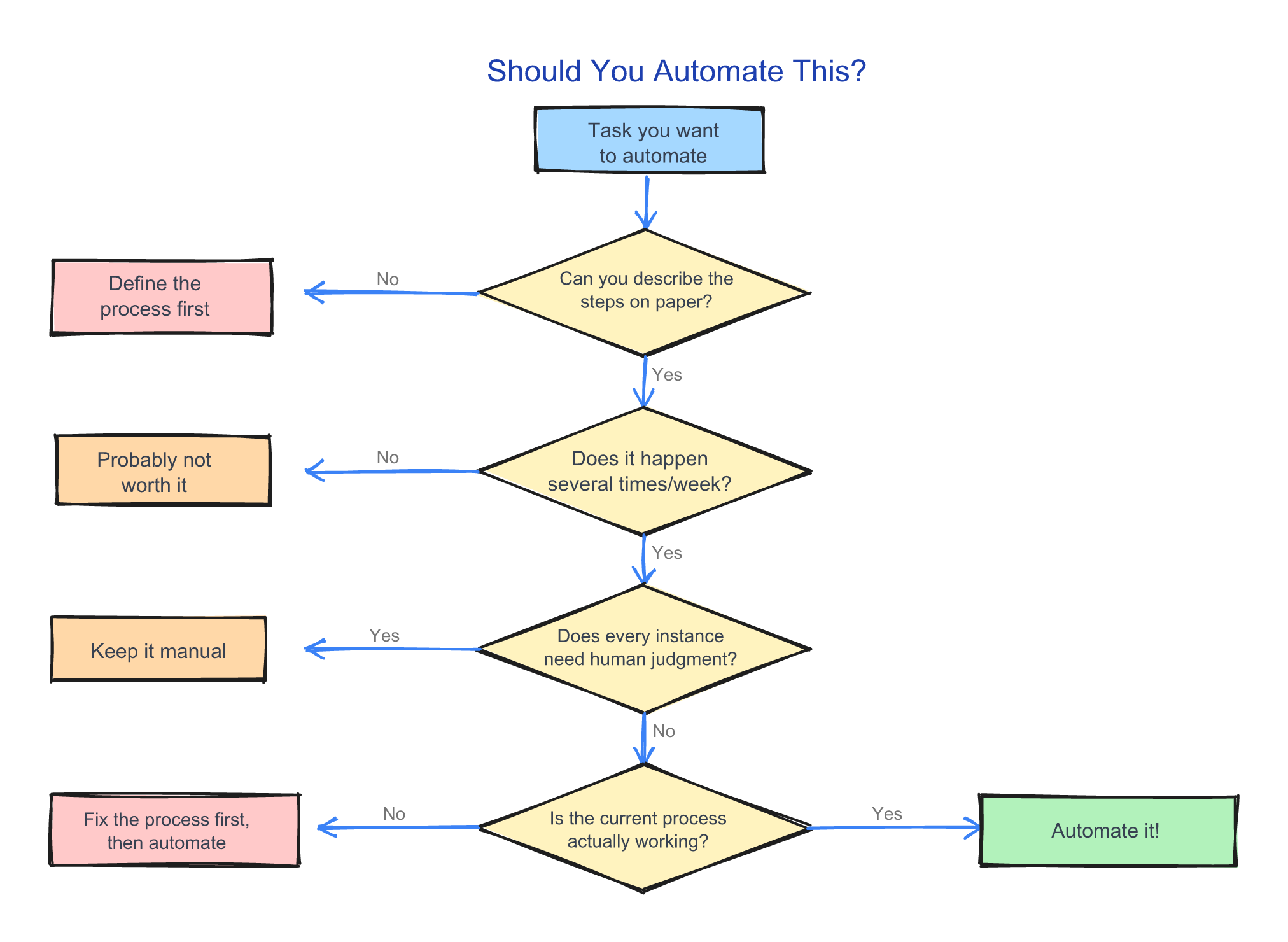
Your process isn’t defined yet. Can’t describe the steps on paper? Can’t automate them. Automating chaos gives you faster chaos.
The task happens fewer than 10 times a week. Automation has setup costs, and if you’re doing something twice a week the math doesn’t work.
Counterpoint: if you are doing something less often but it takes A LOT of time and meets the other requirements, ignore this…
Every instance requires genuine human judgment. Some tasks look repetitive but need nuance every time — custom proposals, sensitive client communications. If a human makes a real decision at every step, a tool won’t help.
You’re automating to avoid fixing a broken process. If clients are unhappy with your onboarding, automating it just makes them unhappy faster. Fix the experience first, automate the execution second.
The real question
Can you afford not to?
That $18,200/year number from earlier doesn’t shrink because you’re busy — it compounds. Start with one workflow and see what changes.
Not sure where to start? Browse the archive — the automation write-ups there walk through how I picked the first workflow worth improving in each case.
Related reading:
- 3 Automations I Built That Run Without Me — Real automation examples with code and ROI math
- The No-Code Automation Stack for Non-Technical Founders — The tools to build your first automations
- 5 Automations Every Service Business Should Have by 2026