I’ve spent the last year watching engineering teams adopt AI tooling (Claude, GitHub Copilot, CLI agents) and the pattern is always the same. Someone on the team gets excited, starts shipping faster, and then something breaks in a way nobody expected. A hallucinated business rule. A test that covers lines but validates nothing. A secret that almost made it into version control because the model “helpfully” refactored a config file.
These tools can make your team faster. But enterprise environments need predictability, auditability, and policy enforcement. Not unrestricted autonomy. Consistent, reviewable automation that fits your compliance and security requirements.
This is what I’ve learned about making that work.
Why Now
The models are getting better
The models have reached an inflection point. I was writing about 80% of the code and using AI tools about 20% until around December. That has flipped.
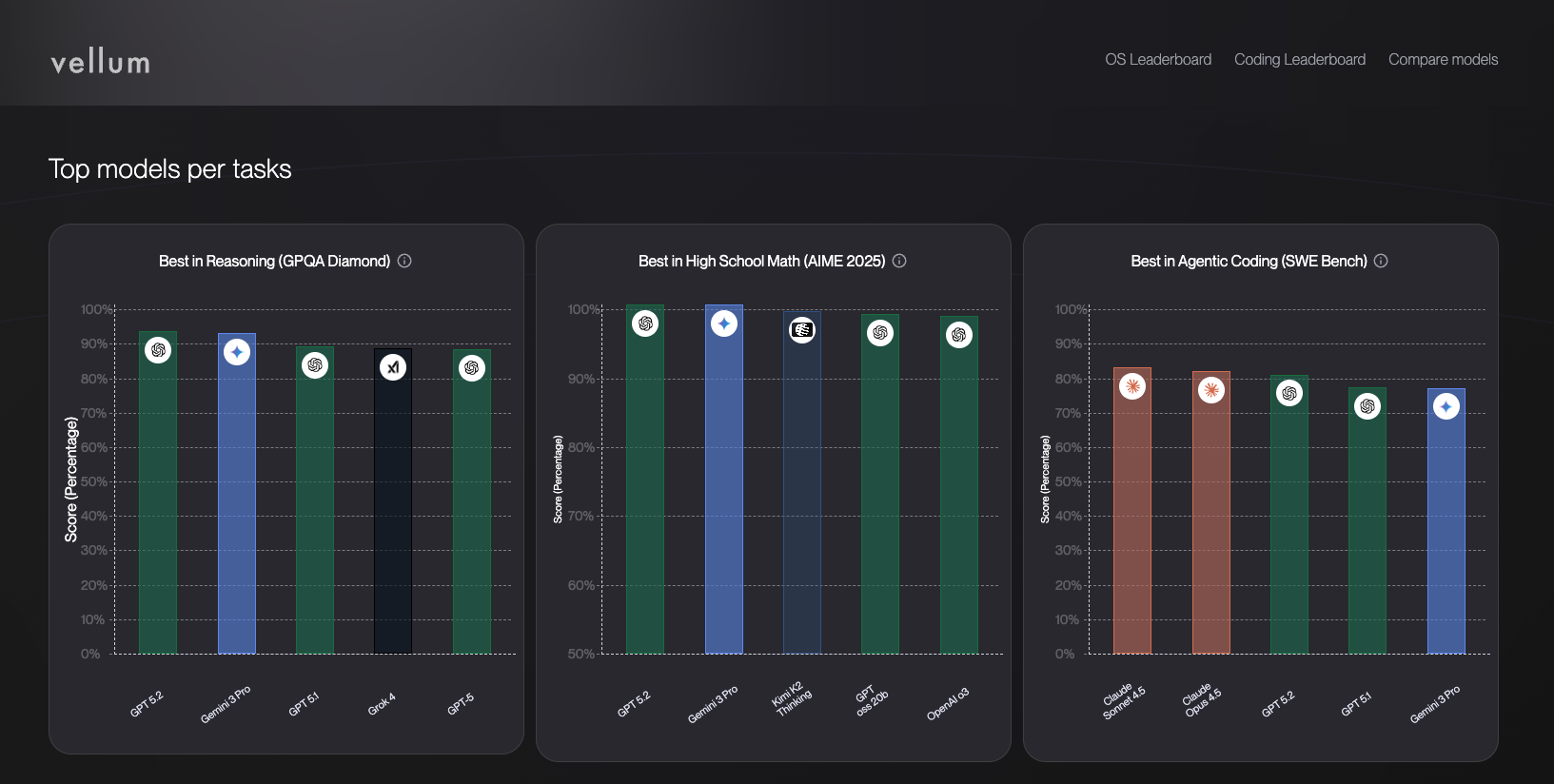
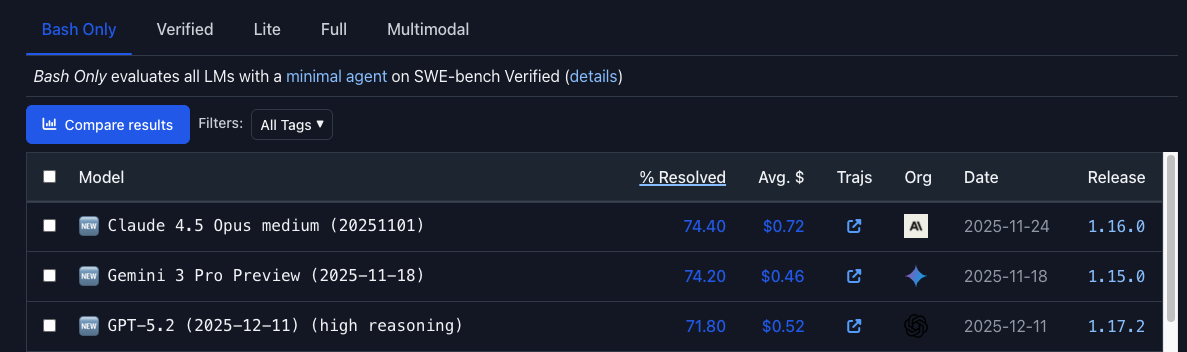
These models are now REALLY good. The premier models (Gemini 3, Claude Opus, GPT 5.2/codex) are scoring ~80% on SWE-bench verified, which is the LLM equivalent to HackerRank or HackerEarth. These are real problems and the models are solving a larger percentage of them, these are borderline-Senior Engineer+ level results.
The models are getting cheaper
Subsidized Sonnet 4.5 usage now costs only ~$10/hour for some use cases, effectively reaching parity with the US minimum wage. source
This is less than you pay for a happy meal. And these agents can run 24 hours straight. Solving complex engineering problems with no breaks, no sleep, no coffee.
Why Enterprises Need Guardrails
All AI tools in an enterprise environment need to be enterprise-approved, integrated with SSO, and restricted to enterprise workspaces. That’s not bureaucracy for its own sake. It prevents data leakage, untracked changes, and compliance violations.
But the deeper issue is more interesting: enterprise software engineering is deterministic work, and LLMs are probabilistic systems.
The same input should produce the same output. That’s the expectation. LLMs don’t work that way. They sample from probability distributions, looking at ALL possible next tokens, assigning a probability to each, and randomly sampling from that distribution. Variability comes from temperature, Top-P, and Mixture of Experts (MoE) routing.
For example: You ask the Model, “Today the weather is _________” and it samples all possible next words, 50% of the time it might return “Sunny”, 20% of the time it might return “Rainy”, 10% of the time “Nice”…
This variability is where creativity and reasoning comes in, it is designed that way. It’s why they can write poetry (not very well yet) and why they can think.
Similar to asking 10 friends the same question. Their answers will vary slightly even though they know the same information.
What this means in practice:
- Identical prompts can produce different outputs
- Multi-step agent workflows compound error rates
- Silent failures happen without guardrails
The Compounding Error Problem
This one catches people off guard. If an AI agent is 90% correct per step (sounds great, right?) and you chain 5 steps together:
0.9⁵ ≈ 59% overall correctness
That’s how you end up with incorrect reports, misapplied business rules, and gradual logic drift that nobody notices until something breaks in production.
Guardrails reduce variance. They don’t eliminate AI usage. Fewer steps, stronger constraints, human checkpoints. Higher reliability.
Agents, Context Windows, and Tokens
Before getting into workflows, there are three concepts that govern how every AI tool actually works. Worth understanding even if you never build an agent yourself.
Agents
An agent is a calculator, not a brain.
- It knows only what you give it right now
- It doesn’t remember past sessions or decisions
- It repeats mistakes unless rules live in files
State lives in code and docs, not in the model.
Context Windows
The context window is the agent’s RAM. Everything it can “see” must fit inside it, and when it fills up, old information silently drops. The agent won’t warn you when context is lost.
If it’s not in the window, it doesn’t exist.
Tokens
Tokens are the budget you spend to think. Prompts, files, and outputs all consume them. Code is token-expensive, and repetition wastes what you have. Overspend on input and you push out the context that actually matters.
PTMRO: How All Agents Work
Every agent workflow (Claude, Copilot, Gemini, custom CLI tools) follows the same five steps. I call this PTMRO:
Planning → Tools → Memory → Reflection → Orchestration
| Step | What It Does |
|---|---|
| Planning | Define the task, scope, and constraints |
| Tools | Select models, agents, or integrations |
| Memory | Track context, history, and state across steps |
| Reflection | Evaluate outputs, detect errors, learn patterns |
| Orchestration | Coordinate multiple agents, manage parallel execution, ensure completion |
When an agent produces bad output, the issue is almost always in Planning (unclear scope) or Memory (lost context). Understanding this framework helps you figure out which one.
Prompting & Task Design
Know Your Agent
GitHub Copilot lets you choose between AI models with different strengths. Which model you pick affects response quality, code relevance, and performance. Check the model comparison docs before assuming one size fits all.
Write Better Prompts
Good prompts are specific, scoped, and anchored to actual source files.
Core Foundations
Start with clarity. Define your goal, the output format you want, and length constraints upfront. Ambiguity in, ambiguity out.
XML tags and structured formatting help the model parse instructions and organize its response. Use them.
And iterate. Prompts are rarely right on the first try. Version them, test them, refine.
Power Techniques
| Technique | What It Does |
|---|---|
| Role-Based | Assign the AI an expert persona for domain-specific responses |
| Chain of Thought | Ask the model to reason step-by-step before answering |
| Few-Shot Learning | Provide examples of the desired output |
| Style Unbundling | Describe qualities of a style rather than copying it |
| Negative Constraints | Specify what to avoid |

| Weak | Strong |
|---|---|
| ”Fix this bug." | "Debug src/users/roleResolver.ts: login succeeds for disabled users. Add tests under tests/auth/roleResolver.test.ts.” |
Rule of thumb: intent + files + constraints + output format.
A real example:
“Refactor
src/orderController.jsfor readability, replace callback chains with async/await, add complete JSDoc, and generate a diff-only patch.”
Less ambiguity, more deterministic output, easier to review.
Don’t Over-Engineer Your Prompts
Specificity helps, but overthinking prompts kills productivity.
You don’t need to memorize internal directives. Agents already know their tools. Prompt like ordering food. You ask for the dish, the kitchen handles execution.
| Scope | Accuracy |
|---|---|
| One well-scoped task | ~90% |
| Three loosely scoped tasks | ~73% |
When correctness matters, collapse steps.
The CLEAR Framework
I use this as a mental checklist, not a rigid template:
| Letter | Meaning | Description |
|---|---|---|
| C | Context | Background, purpose, constraints |
| L | Logic / Layout | Clear structure (steps, bullets) |
| E | Expectations | Style, depth, success criteria |
| A | Action | Explicit task (generate, refactor, explain) |
| R | Response Format | Table, JSON, diff, sections |
Iterative Workflow: Ask → Review → Execute
This is the most important pattern in this entire post. Treat AI as a collaborator, not an executor.
1. Ask (Proposal Only)
Request a plan, not code.
“Generate a task plan for introducing feature flags to checkout-service. Break into subtasks, estimate risk, and identify required files.”
2. Review
Engineers validate scope, risk, files touched, rollout complexity. Refining prompts is cheaper than rewriting code.
3. Execute
Once aligned, generate code, add tests, update config or migrations. All AI-generated changes go through standard code review. No exceptions.
Watch Workflows Run
Long workflows should never be “fire and forget.” I watch mine run for a few reasons:
- Misinterpretations surface early
- You learn how the agent breaks down tasks
- If something’s going sideways, you can interrupt and redirect
Most agent tools expose their plans, reasoning, and execution steps. Use them. They’ll show you where your prompts are weak and where the model’s assumptions don’t match yours.
Context Management
This is where most teams leave the biggest gains on the table.
Context isn’t tool-specific anymore. If you’re using multiple AI tools (and you probably are), maintain equivalent context files for each:
| Tool | Context File |
|---|---|
| Claude | CLAUDE.md |
| OpenAI / Custom Agents | AGENTS.md |
| Google Gemini | GEMINI.md |
| GitHub Copilot | copilot-instructions.md |
Keep these at the repo root. Content should be consistent across them even if syntax differs.
What Goes In
- Architecture overview
- Domain language and invariants
- Coding standards
- Error-handling patterns
- Logging and telemetry requirements
- Testing expectations
- Feature flag systems
- Approved libraries
- Examples of “good” diffs and tests
Example
# AI Prompting Instructions (Universal)

## Purpose
This file provides instructions to the AI assistant for generating Java Spring code
aligned with enterprise coding standards, testing practices, and architecture guidelines.

## Tech Stack
- Java 21 (JDK 21 with toolchain)
- Spring Boot 3.3.4
- Spring Data JPA with Hibernate
- Gradle 8.x
- PostgreSQL (with AWS Secrets Manager driver)
- JUnit 5 + Mockito
- Lombok
- AWS SDK (S3)
- Swagger/OpenAPI
- Jacoco (85% minimum coverage)
- SonarQube
Why bother? Fewer hallucinations. More consistent output. Shorter prompts because the context file does the heavy lifting and you stop repeating yourself every session.
Copilot Chat in Enterprise IDEs
Copilot Chat is the default AI interface in IntelliJ and VS Code. A few things I’ve learned about getting more out of it.
Keep your IDE up to date. New models and features ship frequently. Old versions mean missing capabilities.
Use named context instead of pasting code. Selectors like @workspace, @file, @editor, @tests, and @terminal point the model at the right files without eating your token budget. Example:
@fileRefactor this file for readability and add missing JSDoc comments. Preserve the existing error-handling pattern described indocs/error-handling.md.
Ask for explanations before changes. This habit pays for itself:
@fileExplain what this function does and list all possible failure modes. Do not suggest changes yet.
You’ll catch incorrect assumptions, hidden invariants, and edge cases before any code gets generated.
Always run tests and review manually. Copilot can generate tests, docs, and API handlers. It can’t tell you whether they’re correct. That’s still your job.
CLI Tools & Secure Integration
Approved enterprise CLIs include GitHub Copilot CLI (gh copilot), Anthropic’s claude CLI, and internal wrappers with policy enforcement.
A few ground rules:
- Use scoped, rotating API tokens
- Disable local caching if prohibited
- Log all codegen actions
- Prefer
--dry-run
claude codegen \
  --prompt "Add pagination to GET /orders" \
  --files src/api/orders.ts \
  --dry-run
Productivity Multipliers
Speak, Don’t Type
This sounds trivial. It’s not. Typing runs 50-70 WPM. Speaking runs 150-200 WPM. That’s roughly 3x more context you can feed an agent in the same amount of time.
Enable OS dictation, speak your prompts, then clean them up. More context means better output.
Paste Over Typing
Paste logs, stack traces, error messages directly. Don’t try to summarize them. The model is better at parsing raw data than you are at summarizing it under pressure.
Code Quality, Testing & Governance
AI accelerates code writing. Humans remain responsible. Speed without review is just faster failure.
Before Merging
- Run all tests (local + CI)
- Manual code review
- Validate architectural patterns
- Check for silent logic changes, missing security controls, incorrect error handling, hallucinated comments
- Check with other squads when extending or modifying shared endpoints
AI Safety Rules
- NEVER modify credentials or API keys without explicit approval
- NEVER move secrets out of
.envfiles or hardcode them into the codebase - Log ALL self-modifications as a changelog
Coverage vs. Intent: The Test Quality Problem
This is one of the most common failures I see with AI-generated tests. Coverage-only tests hit lines but miss logic. They verify nothing meaningful.
Here’s what coverage-only tests look like:
@Test
void testValidation() {
    OrderRequestDto request = new OrderRequestDto();
    request.setOrderType("subscription");
    request.setCustomerId("CUST-001");
    request.setRegion("US");
    request.setPlan("enterprise");
    request.setBillingCycle("annual");
    request.setProductCode("PRD-200");

    assertTrue(validator.isValid(request));
}

@Test
void testInvalidRequest() {
    OrderRequestDto request = new OrderRequestDto();
    request.setOrderType("subscription");

    assertFalse(validator.isValid(request));
}
Lines: ~80% | Branches: ~20% | Logic verified: None | Error messages verified: None
Now compare with intent-driven tests:
@Test
void isValid_SubscriptionMissingPlan_ReturnsFalse() {
    OrderRequestDto request = new OrderRequestDto();
    request.setOrderType("subscription");
    request.setCustomerId("CUST-001");
    request.setRegion("US");
    request.setBillingCycle("annual");
    request.setProductCode("PRD-200");
    // Missing plan

    assertFalse(validator.isValid(request));
}

@Test
void getValidationError_subscriptionMissingFields() {
    OrderRequestDto request = new OrderRequestDto();
    request.setOrderType("subscription");
    request.setCustomerId("CUST-001");
    request.setRegion("US");
    request.setBillingCycle("monthly");

    assertEquals(
        "Product code, plan, and billing cycle are required for subscription orders",
        validator.getValidationError(request)
    );
}

@Test
void isValid_OneTimeOrderWithRecurringBillingCycle_ReturnsFalse() {
    OrderRequestDto request = new OrderRequestDto();
    request.setOrderType("one-time");
    request.setCustomerId("CUST-001");
    request.setRegion("US");
    request.setBillingCycle("annual");

    assertFalse(validator.isValid(request));
}
Lines: ~95% | Branches: ~95% | Logic verified: All paths | Edge cases: 10+ scenarios
Night and day. If your AI-generated tests look like the first example, you have coverage theater. Not quality.
Parallelization: Scaling Your AI Team
Most workflows run one agent at a time. You can do better. Open multiple terminal instances in VS Code, run different agents in separate terminals, each with its own session and context.
Three parallel agents seems to be the sweet spot before your system starts dragging:
| Terminal | Agent | Use Case |
|---|---|---|
| Terminal 1 | Claude Sonnet / Opus | Planning or code refactoring |
| Terminal 2 | GPT (OpenAI / Custom) | Test generation or code explanations |
| Terminal 3 | Gemini | Documentation or reviewing outputs |
It’s like adding more engineers to the team, except they work at token speed and don’t need coffee.
Appendix: The DOE Framework for Agentic Workflows
For teams building more complex agent pipelines, the Directive-Orchestration-Execution (DOE) framework gives you a clean separation of concerns.
Want the complete implementation guide? Download my free Agentic Workflows Guide for detailed patterns, case studies, and production deployment strategies for the DOE framework.
Layer 1: Directive (Intent and Rules)
Define what should be done in plain language. Store these as SOPs in Markdown under directives/. Include goals, inputs, tools to use, expected outputs, edge cases. Write them like you’d write instructions for a mid-level engineer. Clear, scoped, actionable.
This layer pins down business logic and expectations before any model or code execution happens.
Layer 2: Orchestration (Decision Making & Control)
The control plane. Reads directives, figures out the order of operations, calls deterministic execution scripts, handles errors and retries, manages state. Think of it like a conductor in an orchestra. It decides when and how each component contributes.
Layer 3: Execution (Deterministic Work)
The actual work. Rapid, reliable, testable. Implemented as deterministic code in execution/. Handles API calls, data processing, file operations, database interactions. Built for auditability and review. Execution code should never trust the model to generate correct operational logic.
If your team is picking up AI tooling, don’t try to do everything at once. Start with two things: context files at your repo root and the Ask → Review → Execute workflow. Those two changes alone will noticeably improve your output quality and cut rework.
Everything else in this post? Layer it on as the team gets comfortable. But context and iteration are the foundation. Start there.