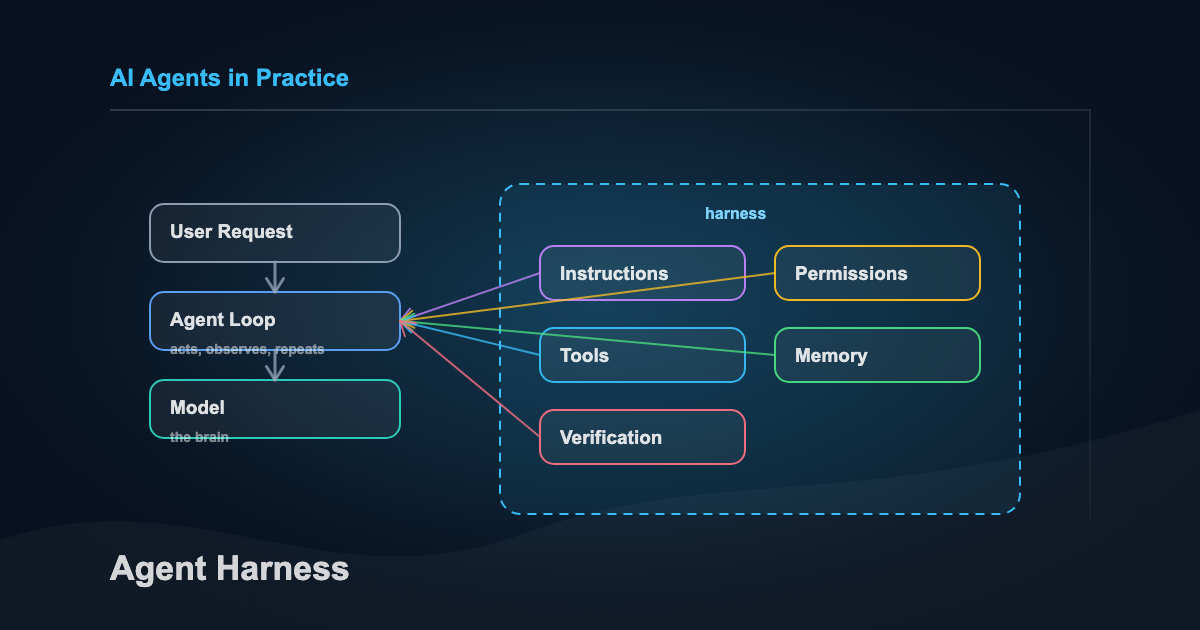
If you keep hearing people say “agent harness” and quietly think, cool, another term I am supposed to pretend I understand, this is the useful version.
This is for people trying to understand the weird infrastructure now sitting around models: Claude Code, Codex, Cursor, LangGraph, MCP servers, custom skills, repo instructions, permissions, hooks, and all the new agent plumbing that suddenly matters.
The short answer:
The model is the brain. The harness is the operating environment that makes the brain useful.
Or even shorter:
Models generate answers. Harnesses generate trust.
That’s the whole game.
Start with the agent
At the simplest level, an AI agent is a model inside a loop:
- You give it a task
- The model thinks about what to do
- It either answers or calls a tool
- The tool does something
- The result goes back to the model
- The loop repeats until the task is done
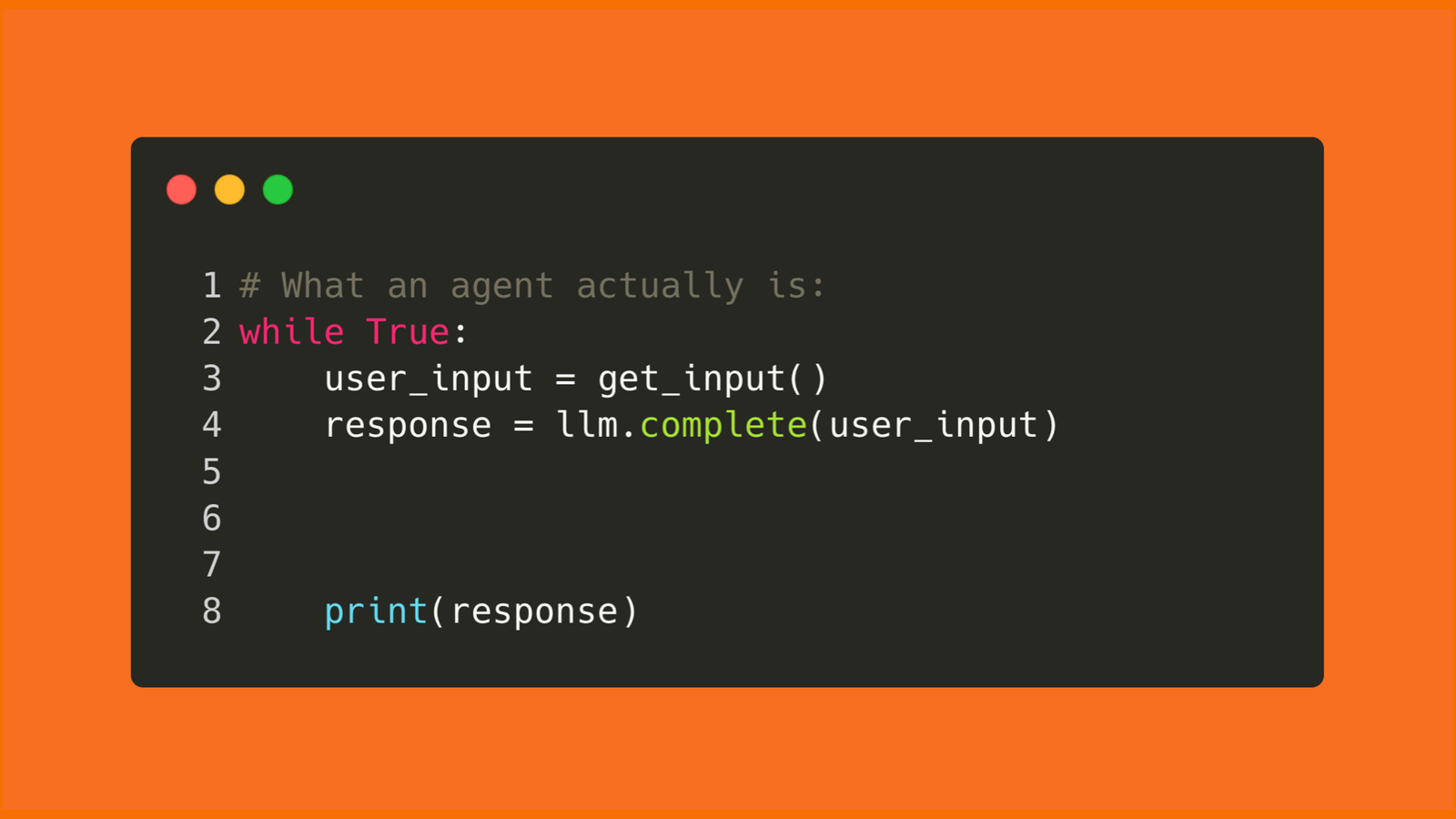
That loop can be a few dozen lines of code or a whole product with permissions, memory, tools, logs, tests, and UI wrapped around it. The loop is the seed. The harness is what makes it safe and useful in real work.
The problem: same model, different results
The easiest mistake to make with agents is blaming the model for everything.
Sometimes the model really is the problem. Most of the time, it isn’t.
The same model and task can produce wildly different output because the environment around the model changes what it sees, what it can do, how it gets checked, and when it is allowed to stop.
One setup produces a clean pull request, runs the tests, catches the edge case, and leaves you a useful summary.
Another setup changes the wrong file, forgets the project conventions, says “done” without verification, and confidently hands you cleanup work disguised as productivity.
A better model helps. A better harness narrows the variance.
The model gives you raw capability. The harness determines whether that capability shows up reliably in real work.
Model vs. agent vs. harness
People blur these words together, so separate them first.
| Term | Plain-English meaning | Example |
|---|---|---|
| Model | The brain that predicts, reasons, and writes | Claude, GPT, Gemini |
| Agent | The model plus a loop that lets it take actions | Claude Code fixing a bug |
| Harness | The system around the agent that guides and checks the work | Instructions, tools, memory, tests, hooks |
| Tool | Something the agent can use | Shell, browser, file search, calculator, MCP server |
| Memory | Context that survives beyond one prompt | CLAUDE.md, AGENTS.md, project memory, handoff notes |
If you only remember one line:
A model thinks. An agent acts. A harness keeps the agent from acting like an idiot.
A harness is not the same thing as a framework
This is where the term gets slippery.
A framework helps humans assemble agents. LangGraph, LangChain, and similar tools give you abstractions: graphs, state, nodes, retrievers, tool bindings, memory options, middleware, and routing. You can use those pieces to build a harness.
But the framework itself is not automatically the harness.
A harness is the working operating environment around the agent. It already knows how to run the loop, expose tools, inject project context, enforce permissions, recover state, verify outputs, and keep useful memory. The human provides the goal. The harness gives the model enough structure to do the work without needing a human to hand-wire every step.
That distinction matters for teams. If you buy or build a framework, you still own the harness design. If you use a product like Claude Code, Codex, Cursor, or Windsurf, you are already working inside a harness. The question becomes how well that harness fits your codebase, risk tolerance, and workflow.
The simplest harness you already know: CLAUDE.md
Claude Code is a useful doorway into this idea because the harness is visible.
Every serious Claude Code setup eventually has a CLAUDE.md file. The cross-tool version of the same idea is often AGENTS.md. Anthropic’s docs describe memory as persistent instruction Claude reads at the start of a session. It carries project context across fresh conversations: build commands, folder structure, testing rules, coding standards, workflow preferences, and the mistakes Claude should stop repeating. That’s harness work.
Your CLAUDE.md isn’t the agent or the model. It’s one guide inside the harness.
A good one feels less like motivational advice and more like a brief you would give a sharp contractor before they touched your codebase:
# CLAUDE.md

## Project
One sentence on what this project does and who uses it.

## Stack
Framework, language, database, deployment target.

## Commands
- Dev: `npm run dev`
- Build: `npm run build`
- Test single file: `npm test -- path/to/file`
- Type check: `npx tsc --noEmit`

## Architecture
- `src/lib/services/` - business logic
- `src/components/` - UI components
- `src/app/api/` - API routes
- `docs/decisions/` - architecture decisions

## Rules
- Never commit `.env` files or secrets
- Make minimal changes and avoid unrelated refactors
- Run type check after code changes
- Static export only, no server-side features

## Workflow
- Ask before making architectural changes
- Run tests before saying the task is done
- When unsure between two approaches, explain the tradeoff
That file doesn’t make the model smarter. It makes the environment stricter and gives the model fewer ways to wander off.
Here’s the shape of the whole thing:
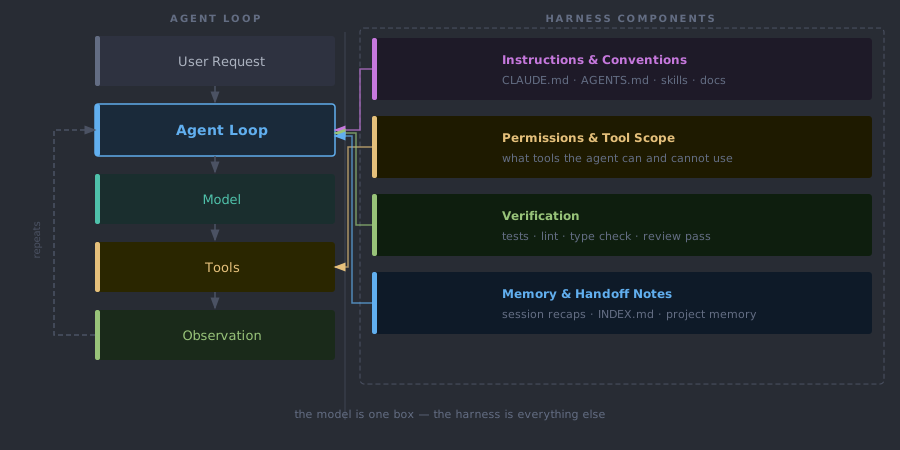
The model is one box in the middle. The harness is the stuff around it that decides what context it gets, what it can touch, how it proves the work, and what survives after the session ends.
What a harness actually does
A harness has two jobs:
- Help the agent get it right the first time
- Catch problems early enough that the agent can correct itself
Martin Fowler’s framing is useful here. He splits a harness into guides and sensors.
| Piece | What it does | Examples |
|---|---|---|
| Guides | Shape the agent before it acts | CLAUDE.md, AGENTS.md, skills, tool descriptions, project docs |
| Sensors | Check the agent after it acts | tests, linters, type checks, screenshots, review agents |
| Memory | Carries forward what should survive the session | project memory, handoff notes, session recaps, index files |
Guides steer the agent before it acts. Sensors tell you whether the work actually held up. Memory is the notebook you leave for tomorrow.
If your setup only has guides, the agent may sound aligned and still ship broken work. If your setup only has sensors, the agent may fail repeatedly before it learns what you wanted. A useful harness needs both.
The loop looks like this:
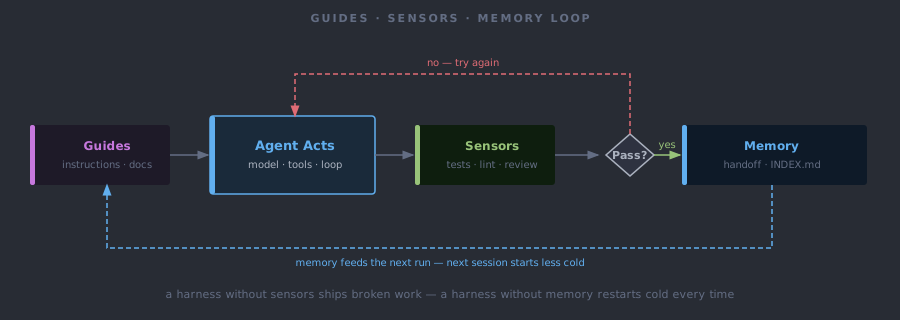
Take note of the last arrow. A harness controls how the agent acts this time and how the next run starts a little less cold. That’s how it improves.
The architecture underneath
Once you move past the plain-English version, a modern harness starts to look like a small control plane for agent work.
The Arize infographic is useful here because it shows the nine pieces as one system, not a loose checklist.
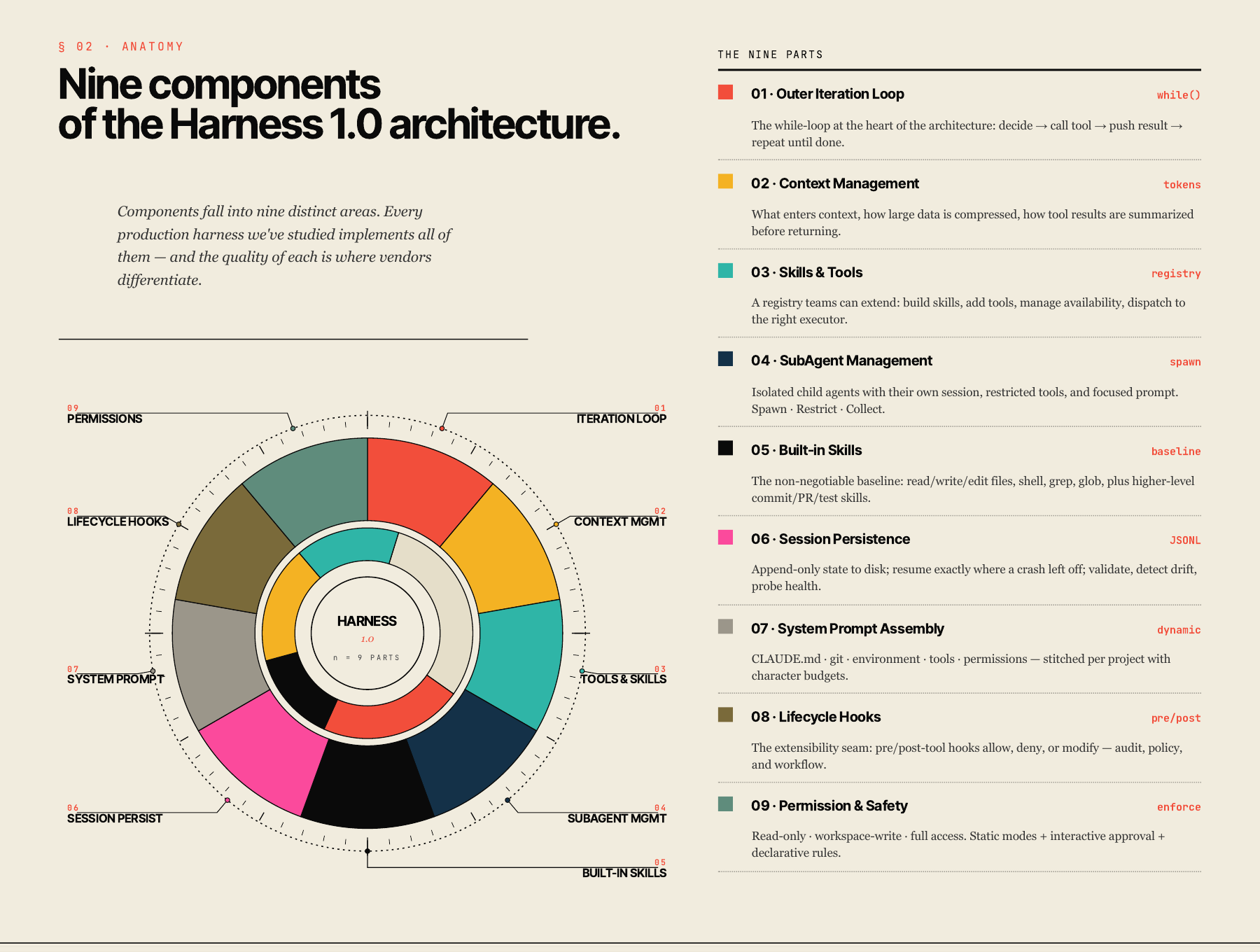
You can open the full Arize visual primer if you want the original context. My translation for an engineering team:
| Harness piece | What it decides |
|---|---|
| Outer iteration loop | How the agent acts, observes, and keeps going until the task is done |
| Context management | What enters context, what gets compressed, and what gets left out |
| Tools and skills registry | Which actions the agent can take, and how those actions are described |
| Built-in skills | The default moves the agent should know, like reading files, editing code, running tests, or preparing a PR |
| System prompt assembly | How project instructions, environment details, git state, and tool rules get stitched together |
| Permission and safety layer | What the agent can touch without asking, what requires approval, and what is blocked |
| Lifecycle hooks | What custom policy runs before or after tool use, such as audit logging or secret checks |
| Session persistence | What survives a crash, compaction, handoff, or tomorrow’s fresh session |
| Sub-agent management | When focused child agents can be spawned, what they can access, and how their results come back |
That is the part that makes this more than prompt engineering. A prompt can ask the model to be careful. A harness can route the model through tools, checks, permissions, and recovery paths that make care more likely.
The best harnesses push judgment to the model where judgment belongs, but keep control in the system where control belongs. The model can decide which files matter. The harness decides whether it is allowed to delete them.
Same model, better harness
This isn’t just semantics.
LangChain published a useful example in February 2026. They kept the model fixed and changed the harness around their coding agent. The score moved from 52.8 to 66.5 on Terminal Bench 2.0.
Same model improved ~14 points from changing the harness.
What factored into the changes:
- better system prompts
- better tool setup
- middleware that pushed the agent to verify before finishing
- trace analysis to see where the agent failed
- loop detection when the agent kept editing the same file without progress
That’s the pattern teams should steal.
Don’t start by asking, “Which model will solve this?”
Instead ask, “What does the model need around it to do this reliably?”
A simple example
Say you ask an agent to fix a failing test. Without much of a harness, the session often looks like this:
- The model reads your prompt
- It scans a few files
- It changes some code
- It rereads its own code
- It says “done”
That sounds fine until you notice the missing step:
It never ran the tests.
With a basic harness, the flow changes:
- The agent starts and loads the project instructions
- It sees the commands, conventions, and files that matter
- It changes the code
- The harness tells it to run the test command before exiting
- If tests fail, the agent keeps going
- When it finishes, it writes a short handoff note
The model didn’t get smarter. What changed was the environment around it.
The minimum viable harness
You don’t need a six-agent system, a vector database, and twenty custom tools to get value from this.
Please don’t start there. That’s how you end up debugging your infrastructure instead of doing the work.
For most teams starting out, a minimum viable harness is four things:
| Layer | Small version | Why it matters |
|---|---|---|
| Instructions | CLAUDE.md or AGENTS.md | The agent knows the project before you re-explain it |
| Tools | One or two tools it actually needs | The agent can act instead of only talk |
| Verification | Test, lint, type check, screenshot, review pass | The agent has to prove the work |
| Memory | Handoff note, index file, project memory | The next session doesn’t start cold |
That’s already a harness, even if it’s ugly and amounts to one markdown file and one test command. The point is reliability, not complexity.
What this looks like in an engineering org
For a real team, the harness becomes part of engineering operations.
Not a giant platform on day one. More like a shared operating agreement for how AI is allowed to work inside the codebase:
- A repo-level
AGENTS.mdorCLAUDE.mdthat names architecture, commands, boundaries, and review expectations - A small approved tool set for common work: file search, file edits, shell, browser, test runner, docs lookup
- Permission modes for read-only work, workspace edits, and dangerous actions
- Hooks that block secrets, destructive shell commands, production credentials, or unreviewed deploy paths
- Verification gates that make the agent run the same checks a human engineer would run
- Session notes that let another human or agent understand what changed and what remains uncertain
- A small eval set of real tasks that shows whether the harness is getting better or just getting louder
That is the consulting problem hiding underneath the terminology. Most teams don’t need a lecture about autonomous agents. They need a sane way to let agents touch real work without turning every session into a cleanup bill.
How to write the instruction file
The blunder with CLAUDE.md is treating it like a wish list.
“Be a senior engineer.”
“Think step by step.”
“Write clean code.”
That’s fine but it’s also mostly wasted space. Use the file for things the agent would otherwise get wrong.
The five useful sections are:
-
Critical commands How to build, test, lint, type check, and run one file.
-
Architecture map Where things live and what belongs where.
-
Hard rules The specific mistakes the agent must not make.
-
Workflow preferences When to ask, when to act, how much to change, how to verify.
-
Out of scope Files, systems, or integrations the agent should not touch.
Keep it short.
Anthropic’s current memory docs emphasize hierarchy, imports, recursive lookup, and specific instructions over vague guidance. That last part matters. A CLAUDE.md shapes behavior. It doesn’t physically prevent bad actions.
For enforcement, you need settings, permissions, tests, hooks, or human review. That’s the difference between a guide and a guardrail.
Where tools fit
Tools are the agent’s hands.
They’re how the model does things it can’t do from text alone:
- search files
- run shell commands
- query an API
- calculate something
- open a browser
- read a spreadsheet
- edit a document
The common mistake is thinking more tools equals a smarter agent. Usually it means a more confused one. There’s measurement behind that: tool-selection accuracy drops from around 43% to under 14% as the tool count grows, and every tool definition sits idle in the context window at roughly 300–1,400 tokens whether it gets used or not. The Claude Code team holds about twenty tools and is constantly looking to cut, for one stated reason: every new tool is one more option the model has to reason about before it can act.
Start with the smallest tool set that can do the job. If the task is rewriting a paragraph, it probably needs no tools. If the task is fixing a bug, it needs file access and a test command. If the task is researching current prices, it needs web search or an API.
One tool should have one clear job.
Bad:
manage_files(action, file, destination, overwrite, format, permissions)Better:
read_file(path)
write_file(path, content)
delete_file(path)
The tool description matters too. “Calculator tool” is weak. “Use this tool whenever math is required. Never guess calculations.” is better. Tool design is part of the harness.
Where memory fits
Memory is where people make this sound harder than it needs to be.
There are two simple versions:
-
Conversation memory What has been said in this session.
-
Longer-term memory What should survive across sessions.
Early on, longer-term memory can be boring markdown:
- what changed
- what is still broken
- what command to run next
- what the next session should not repeat
That can live in a handoff note, an INDEX.md, a session recap, or a project memory file.
In my own note system, the pattern is pretty literal. The agent reads an index file, a topic map, and CLAUDE.md before touching anything. That gives the session a map, the rules, and the current state.
That’s not glamorous, but it works.
Workflows before agents
Not every problem needs a fully autonomous agent.
Anthropic makes a useful distinction here: workflows follow predefined code paths, while agents dynamically decide their own process and tool use.
If the steps are predictable, use a workflow:
- write outline
- check outline
- write draft
- review draft
If the steps are not predictable, use an agent:
- inspect this unfamiliar codebase
- figure out why the tests fail
- decide which files to change
- verify the fix
Start with the simplest pattern that works. Most useful setups begin as a boring workflow and only become agents when the model genuinely needs to decide the path.
When multiple agents make sense
Forget the swarm for now. Start with one agent and a good harness. Multiple agents make sense when the roles are meaningfully different:
- one researches, one writes
- one implements, one reviews
- one can read sensitive data, one can execute actions
- one routes tasks, specialists handle narrow domains
If the second agent doesn’t have a different job, permission set, or evaluation role, you probably added complexity for vibes.
The safer pattern is a supervisor:
User -> Main agent -> Specialist agent only when needed -> VerificationThat’s plenty for most teams and most use cases.
There’s one multi-agent pattern worth knowing early, though: separate the person building from the person judging.
Anthropic Labs described this in their long-running application harness. They used a planner, a generator, and an evaluator. The generator built. The evaluator inspected the result with Playwright like a user, graded it against concrete criteria, and sent feedback back into the next sprint. That separation matters because agents are usually too generous when grading their own work. They’ll write mediocre code, reread it, and decide it looks fine. Must’ve missed that invite to reality.
You don’t need that full setup for your first harness. But the principle scales down cleanly:
| Small setup | Bigger setup |
|---|---|
| Write code, then run tests | Generator builds, evaluator tests in browser |
| Ask a second agent to review | Dedicated evaluator agent grades each sprint |
| Write a checklist before starting | Planner and evaluator negotiate what “done” means |
The point isn’t “use three agents.” The point is simpler: don’t let the same session that made the thing be the only judge of whether the thing is good.
What not to overbuild
Don’t turn your first harness into a platform.
You probably don’t need:
- vector search
- twenty tools
- custom dashboards
- multi-agent routing
- long-term autonomous memory
- complex eval pipelines
- a new framework for every task
Start with:
- one job
- one agent
- one clear instruction file
- one or two tools
- one verification step
- five to ten messy test prompts
Then watch where it fails.
When the same failure repeats, improve the harness. That’s the loop.
The practical build path
If you want to build your first harness today, do this:
- Write one sentence describing the agent’s job.
- List the tools it truly needs.
- Write the rules it must follow.
- Define the output format.
- Add one verification step.
- Test it on five real examples.
- Add memory only when the next session needs something from this one.
You can ask an LLM to help design the first version:
I want to build an AI agent.

Goal:
[what I want it to do]

Example user requests:
[5 messy examples]

Tools it may use:
[web search / files / calculator / custom API / none]

Rules it must follow:
[non-negotiables]

It must never:
[boundaries]

Please turn this into:
1. A clear agent spec
2. A system prompt
3. A minimal tool list
4. A verification checklist
5. 10 test cases
The formula is simple:
Agent = Role + Goal + Tools + Rules + Output format
Harness = Instructions + Tools + Verification + Memory
That’s enough to start.
This is also why I built a simple Agent Harness Builder: answer a short quiz, get a paste-ready starter kit for AGENTS.md, RUNBOOK.md, and the first verification path.
The tool isn’t the point. The first 15 minutes are the point. Give the agent enough structure to do one real job, verify it, and leave the next session better off.
Takeaway
A harness is the setup around an agent that makes its work more reliable.
It isn’t just an SDK. It isn’t just a prompt. It isn’t just CLAUDE.md.
It’s the operating environment: the instructions, tools, tests, memory, permissions, hooks, recovery paths, and feedback loops that keep the agent pointed at the job.
The model gives you capability. The harness decides whether you can trust it.
Not all of it lasts. Some of the harness is durable: verification discipline, context preparation, the rule about running tests before calling something done. Some is scaffolding that dissolves as models get better at managing themselves. Anthropic’s team removed the need for context resets entirely when Opus 4.5 landed. A task list that once kept the agent on track became a constraint. Know which half you’re building on.
Sources
- Anthropic, Manage Claude’s memory
- Anthropic, Building Effective AI Agents
- Anthropic, Harness design for long-running application development
- LangChain, Improving Deep Agents with harness engineering
- Martin Fowler, Harness engineering for coding agent users
- Geoffrey Huntley, Ralph Wiggum as an AI agent loop
- Arize, What is a Harness infographic