Context Engineering for AI Coding Tools: Why Your Codebase Structure Matters More Than Your Prompts
Context Engineering for AI Coding Tools: Why Your Codebase Structure Matters More Than Your Prompts
This one is long and a more detailed follow up to my first article on the topic on this
Two things before we get into it: first, you’ll walk away with at least one thing you can apply this week to get more consistent results from your AI coding tool. Second, the examples throughout use Claude Code — that’s my daily stack, not an endorsement. Every principle here applies to Cursor, Copilot, or whatever you’re running. The mechanics differ. The discipline doesn’t.
Let’s start with an example that probably happened to you this week…
You asked your AI coding tool to add a new API endpoint. It generated exactly what you need — right naming convention, file location, and imports. You closed the task in 15 minutes.
Next morning, same tool, same project. You asked for another endpoint. It used a naming pattern from a framework you dropped three months ago. The file landed in the wrong directory. It imported a library that’s no longer in the dependency tree. You spent 40 minutes cleaning it up.
Then a teammate tried the same tool on the same codebase. Their output matched neither of yours.
Same model and codebase produced three completely different results. The variable nobody names: what the AI could actually see. Controlling that is a discipline and many developers aren’t doing it.
The Debate Everyone’s Having Wrong
A few weeks ago, an HN thread along the lines of “Cursor’s context is 10X better than Claude Code’s” hit the front page with 150+ points and hundreds of comments. Developers trading war stories about which tool retrieves the right files, which one hallucinates project conventions, which one actually understands a large codebase.
The thread was comparing tool features — how Cursor auto-indexes and retrieves files by semantic similarity versus how Claude Code relies on explicit file reads and instruction routing. Worth knowing.
But none of it explains why the same tool, same codebase, same developer produces solid output on Tuesday and unshippable output on Thursday. That gap is context engineering.
Context engineering is the discipline of controlling what information an AI coding tool has access to, how that information is structured, and what instructions govern its behavior. It’s distinct from prompt engineering (what you say in a given session) and model selection (which AI you use). You can write perfect prompts and pick the most capable model and still get inconsistent results if the context is wrong.
I wwent into this in more detail here, this variability is actually designed into models to help give them reasoning
Developers who understand this produce more consistent work than any tool comparison would predict. The ones still debating Cursor vs. Claude Code are optimizing the wrong variable.
Why Context Quality Determines Output Quality
Every AI coding tool generates predictions from everything in its context window. That’s not just your last message. It includes the files the tool read earlier in the session, the instruction files it loaded at startup, documentation it retrieved, and the full conversation history. You’re getting a response to everything the model has seen, not just what you typed.
The Primacy Problem. Models recall information near the beginning and end of their context window better than material buried in the middle. The implication is direct: your most important instructions — naming conventions, anti-patterns, what to never modify — belong at the top of your config files, not tucked into section 7 after a wall of boilerplate. Instructions at line 300 of a bloated CLAUDE.md are functionally invisible no matter how well-written they are.
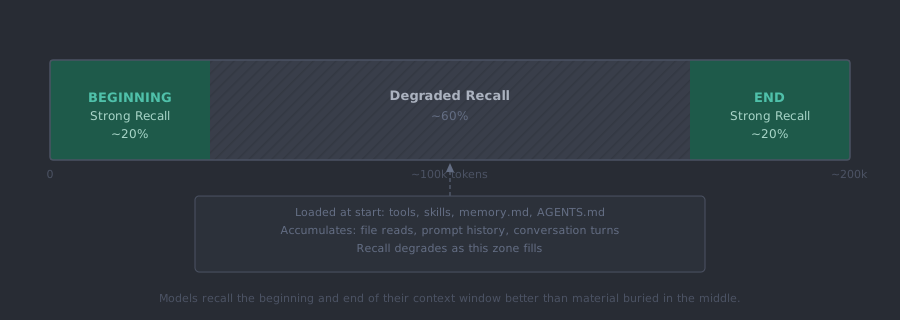
Ask your AI tool: “What naming conventions does this project use?” If it answers correctly without reading a specific file, your context is working. If it asks for clarification or gives you a generic answer, your context engineering needs work.
Garbage in, garbage out applies at the context level, not just the prompt level. A well-crafted prompt can’t compensate for context that’s missing, outdated, or structurally wrong.
Most developers understand this in the abstract. They just haven’t mapped which layer they’re actually investing in. That mapping explains almost everything about inconsistent results.
The Four Layers of Context
Most developers treat context as a single thing: what they’ve said so far this session. It’s actually four layers with very different durability and very different impact.
| Layer | What It Is | How Long It Lasts |
|---|---|---|
| Project structure | Folder names, file naming, co-location of decisions | Permanent |
| Instruction files | CLAUDE.md, Cursor rules, .github/copilot-instructions.md | Permanent |
| File-level docs | Comments, type annotations, explicit naming | Permanent |
| Session context | Files read this session, conversation history | Ephemeral |
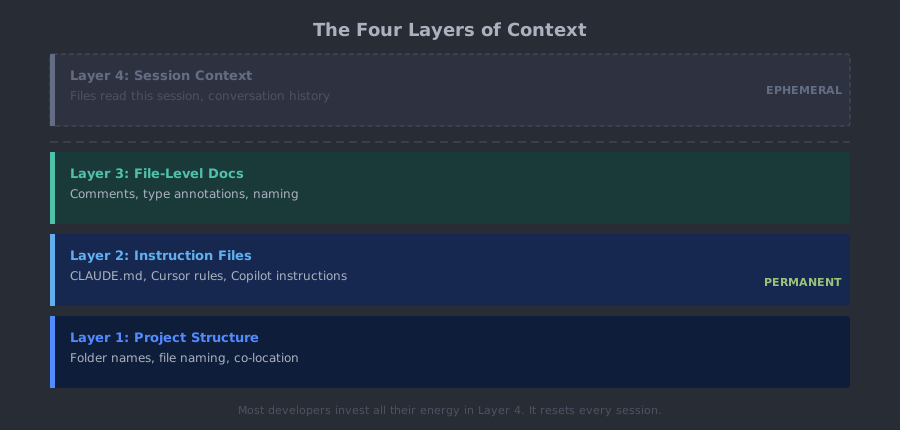
Most developers spend all their energy on Layer 4. The right prompt for this session. Better instructions in this particular message. Layer 4 resets every session. Everything you engineer there disappears at session end.
Layers 1-3 are permanent. They work whether you’re logged in or not. They benefit every session, every developer on the team, every AI tool that touches the codebase.
The math is simple: one hour invested in a CLAUDE.md instruction file compounds across every future session. One hour spent crafting a better prompt compounds across exactly one. Fix the bottom layers and the top layer takes care of itself. The best place to start is your instruction file.
CLAUDE.md Patterns That Actually Work
Every major AI coding tool has an equivalent to CLAUDE.md. Cursor has .cursor/rules. GitHub Copilot has .github/copilot-instructions.md. OpenAI and others use AGENTS.md. Same principle across all of them: a file the AI reads at session start that shapes its behavior for everything that follows.
this file is loaded automatically at the start of every session!
Most teams write this file wrong. They treat it like a README.
A README explains your project. A table of contents tells you where everything else lives. Your instruction file should be a navigation layer: pointers to where conventions are documented, not exhaustive documentation of those conventions. When the agent needs your GraphQL design patterns, it gets routed to the right file. The patterns don’t live in the root config. The root config tells the agent where to find them.
Primacy applies here too. Put project overview and critical anti-patterns at the top. This is deliberate architecture, not formatting preference.
A monolithic root CLAUDE.md that’s 800 lines long is context bloat with a reading time penalty every session. Move subdirectory-specific conventions into CLAUDE.md files within those subdirectories. The root file stays lean.
Most teams skip the exclusion zone entirely. Naming what the AI should never touch matters as much as naming what it can do. Generated code, migration files, lock files, vendor directories — put them on an explicit list. Relying on the model to infer off-limits territory is how you get PRs that modify auto-generated files.
Add YAML frontmatter to your project documentation. When docs, ADRs, and notes carry structured metadata, they become machine-queryable. Ask the agent for “anything tagged with payment-flow” and it surfaces the right files rather than grepping blindly. That’s the closest thing to semantic search without native support.
Here’s a minimal skeleton that reflects the structure that works:
# Project Name -- CLAUDE.md

## Overview
[2-3 sentences: what this is, what it does, the core stack]

## Folder Map
src/api/        - Route handlers. One file per domain.
src/services/   - Business logic. Stateless functions only.
src/models/     - Prisma schema and type definitions.
docs/           - Project documentation. Read before making architectural changes.
docs/decisions/ - Architecture Decision Records. One file per major decision.

## Tech Stack
- Node.js 22 / TypeScript 5
- Prisma + PostgreSQL
- Next.js 15 App Router

## Naming Conventions
- Components: PascalCase
- Utils and hooks: camelCase
- Files: kebab-case
- Database tables: snake_case

## Do Not Touch
- /migrations   - auto-generated, never edit manually
- /generated    - prisma client output, run `npx prisma generate` to rebuild
- src/vendor/   - third-party code, not ours

## Anti-Patterns
- No raw SQL -- use Prisma queries
- No `any` types -- use proper types or `unknown`
- No default exports -- named exports only
This is roughly the structure this vault uses, adapted for a software project. It took many iterations to reach something stable. That’s the nature of the document. You evolve it, you don’t write it once so version control it with your other code changes.
The ROI data on this is concrete. Aakash Gupta’s PM OS (news.aakashg.com, Feb 2026) used a well-crafted CLAUDE.md with skills and sub-agents to reduce PRD creation from 4-8 hours to 30 minutes. Harry Zhang called CLAUDE.md the “highest ROI habit” in Claude Code. Faros AI’s 2026 measurement of Claude Code usage across engineering teams found roughly 4:1 ROI — cost per PR around $37.50 against 2 hours saved at $75/hour. Not controlled studies. Consistent practitioner reports. The pattern holds across enough setups that dismissing it as anecdote is a mistake.
A tight instruction file is necessary but not sufficient. It works better when your project structure isn’t fighting it.
Project Structure as Context Contract
Before the AI reads a single instruction file, it’s already forming a model of your codebase from its structure. Folder names are documentation. File names are documentation. The way you organize things tells the agent what belongs where, what relates to what, and what conventions you follow — automatically, without you saying a word.
Most teams don’t think about this as context engineering. I’ve watched this exact disconnect produce mysterious, inconsistent AI output on every large codebase I’ve touched. The structure is sending signals the team never intended to send.
Consistent naming matters more than you’d expect. If some components are named UserCard, some are user-card, and some are UserCardComponent, the agent is receiving three different signals about the same thing. It can’t infer a convention from contradictions. It produces output that matches whichever form it saw most recently, not the correct form. Three inconsistent names is three opportunities for the wrong suggestion.
Keep tests, docs, and decisions next to the code they describe. A test file two directories away from its source module is context the agent might never retrieve. A test file in the same directory gets read automatically when the source gets opened. Don’t make the agent hunt. It won’t always find what it’s looking for, and you’ll pay for that in bad output.
A docs/decisions/ folder earns its keep fast. One file per major architectural choice, written when you make the decision. When the agent is working in the payments layer and a relevant ADR exists, it surfaces the reasoning behind how things are built. Without ADRs, the agent sees the what and invents the why.
A good practice is to write the architectural map or code in a lookup table in this section so there’s a quick reference for AI to get up to speed on a codebase (every session is ‘new’).
Deeply nested folder hierarchies are a hidden context tax. Every level of nesting increases the probability that relevant files fall outside the context window when the agent is working on something nearby. Flat structure with clear naming outperforms deep hierarchies for AI-assisted work. If your project is necessarily deep, your instruction file routing has to be precise enough to compensate.
Structure produces consistent context. Even perfect structure can’t fix a bloated context window, though. That’s where most sessions quietly break down.
Managing Your Context Window
These examples use Claude Code mechanics because that’s what I work in daily. Every serious AI coding tool has equivalents. The pattern matters more than the specific command.
Check your window before it checks you. Claude Code’s /context command shows token counts for your current session: input tokens used, output tokens, cache status. When input tokens are approaching the model’s limit, output quality degrades. Responses get shorter. Suggestions get less precise. Hallucinations increase. By the time you notice the quality drop, you’re already in it. Check before starting long tasks, not after.
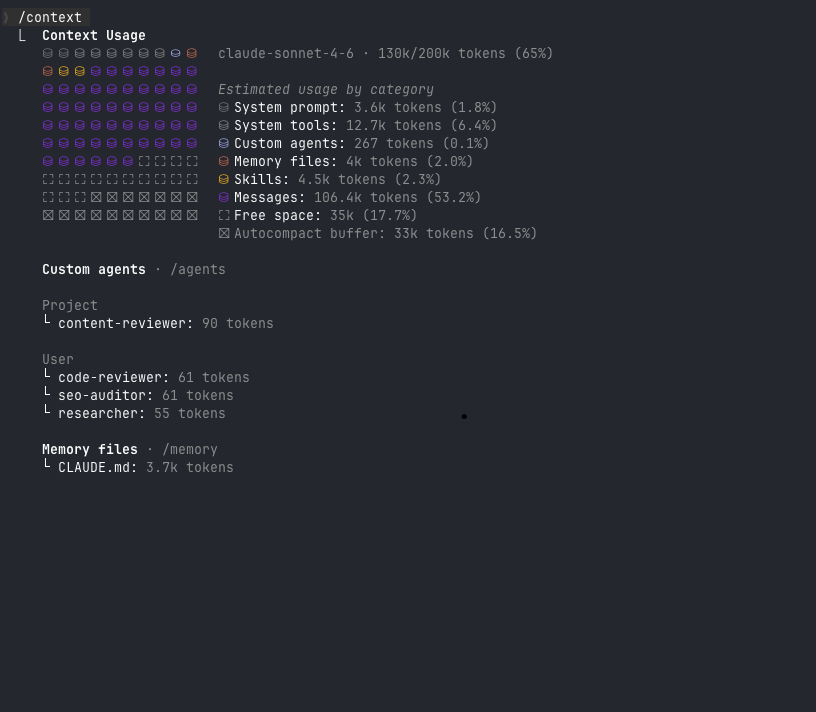 130k of 200k tokens used (65%). Messages account for 106.4k tokens — over half the window consumed by conversation history alone. Free space: 35k. This is the threshold where output quality starts slipping.
Compact vs. new session. The /compact command summarizes your current session and rebuilds a condensed version. Use it when you’re mid-task, need to shed conversation weight, and the working context (decisions made, files read, direction established) is still relevant to where you’re going.
A new session starts clean. Use it when the task is complete, when you’re switching domains, or when accumulated context has drifted from what you’re actually doing. Old context isn’t neutral. It’s noise that pulls the model toward decisions you’ve already discarded.
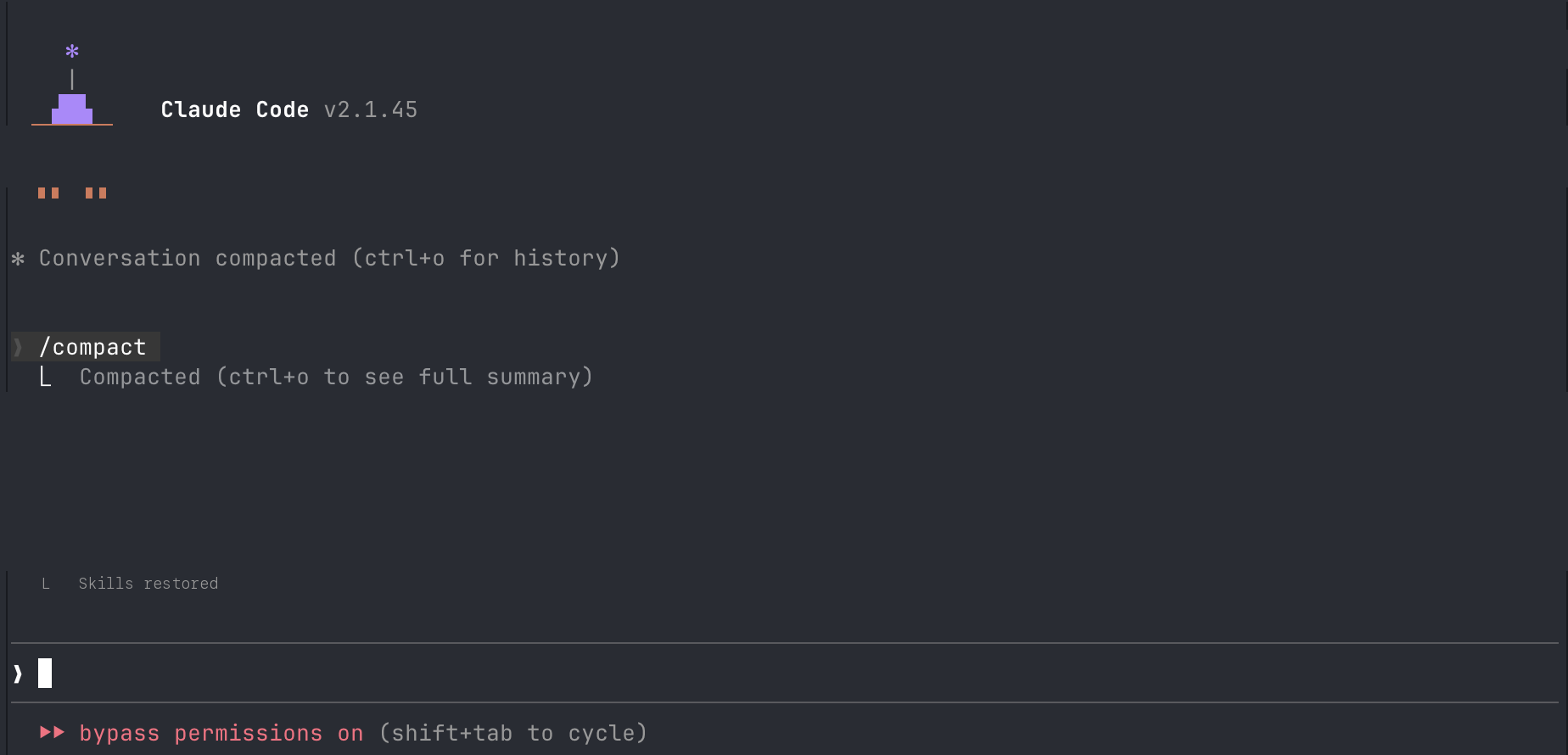 /compact rebuilds the session: Claude re-reads the key files it needs, restores skills, and collapses the conversation into a condensed summary.
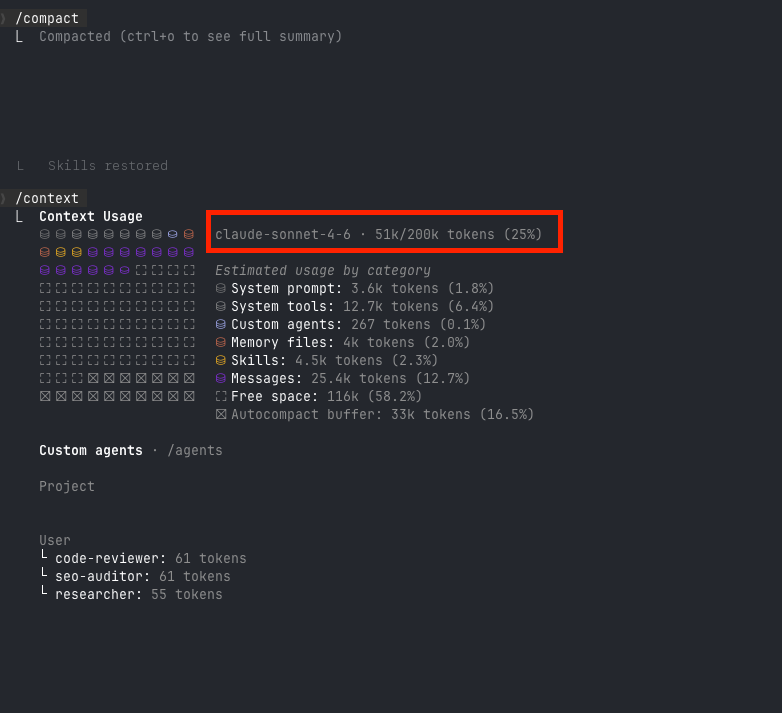 After compact: 51k/200k tokens (25%). Messages dropped from 106.4k to 25.4k. Free space jumped from 35k to 116k. The working context survived. The dead weight didn’t.
Compact preserves momentum. A new session preserves clarity. Clarity usually wins.
Three modes, three different situations. Plan mode (/plan) makes the AI propose before touching anything. Use it for multi-file changes, anything touching shared infrastructure, or any task where you’re not certain what the blast radius is. The proposal step isn’t overhead. It’s the difference between reviewing a plan and reviewing a broken implementation.
Accept with edits is the default for most sessions. The AI does the work, you verify.
Bypass or auto-approve is appropriate only when Layers 1-3 are solid. When the AI knows your conventions, when it has explicit anti-patterns to follow, when the context is tight — that’s when giving it autonomous scope makes sense. Better context engineering is how you earn the right to give your agent autonomy.
/think before complex decisions. This command forces the model to reason explicitly before responding. Use it for architecture decisions, hard debugging, anything where the first answer is likely wrong. You’re not changing the response. You’re changing the quality of the reasoning that produces it.
These three files are your agent’s persistent identity:
~/.claude/CLAUDE.md(user-level): your preferences across all projects — editor config, communication style, how you want code commented./CLAUDE.md(project-level): project conventions, folder structure, anti-patternsAGENTS.md(root): behavioral rules for specific agents or workflows
Without them, every session starts from zero. The agent has no memory of what you’ve built, what you’ve decided, or what you’ve told it to avoid. With them, the agent isn’t starting from zero. It already knows what you’re building and what you’ve decided. That’s the difference between a tool you configure once and a tool you re-brief every morning.
Build that identity well and you’ll want to extend it. That’s where the context budget comes in.
Context Budget: Skills vs. MCP
This tradeoff applies to any framework that extends an AI agent’s capabilities. It shows up in every serious setup. Most developers don’t think about it until sessions start degrading.
Skills are lightweight instruction files loaded at session start. They tell the agent how to do something: a workflow, a content pattern, a code review checklist, a task it performs the same way every time. You write it once. The context cost is fixed and paid once at session start.
MCP (Model Context Protocol) connects the agent to real-time external services. The agent calls a tool mid-session: a database query, a live API call, a current data source. The cost is variable, paid per call, and it stacks. Every MCP call loads tool schemas, the call result, and server responses into the context window.
This compounds. Three MCP calls per task, ten tasks in a session — that’s 30 discrete context injections on top of everything else. A skill-based equivalent, where the workflow is pre-written and the agent follows it, has a fraction of that pressure.
Use MCP when you genuinely need live data. Current timestamps, a real database query, an API response that changes between calls. The output can’t be pre-written because it depends on real-time state.
Use skills when you have a repeatable workflow. Content patterns, review checklists, tasks the agent performs identically every time. Pre-write it once, reference it for as long as the workflow holds.
The decision rule: if you can write it down and have it work 90% of the time, write it as a skill. Every unnecessary MCP call is a context tax paid on every execution. You can even use the MCP first to get something working quickly then create your own skill to get that output.
Auditing Your Context Setup
Your AI should answer these questions from context alone, without reading a specific file:
- What naming convention does this project use for components?
- What’s the tech stack?
- What are the top 3 things I should never change in this codebase?
If it can’t answer question 3, you don’t have explicit anti-patterns documented. That’s the biggest gap in most instruction files, and the first thing to fix.
Signs your context is bloated:
- The AI asks you to clarify things it should already know
- Suggestions don’t match project conventions
- Errors reference wrong library versions or deprecated APIs
If this is happening you should
/compactor start a new session, you aren’t getting optimal results anyways.
Signs your context is working:
- The AI refers to project conventions without being prompted
- Suggestions match naming patterns on first pass
- It knows where things live without being told
The bloated context problem is almost always a Layer 2 issue. The instruction file grew to document everything, contradicts itself in places, and buries the most critical rules in the middle where recall degrades. Trim ruthlessly. Move subdirectory-specific rules to their subdirectory. Keep the root file focused on what’s true across the whole project.
That’s when context engineering stops feeling like maintenance and starts paying for itself.
The Cursor vs. Claude Code debate will be irrelevant within a year. Something will ship that makes both look dated. The debate restarts around whatever that tool is — same framing, same wrong frame.
Context engineering won’t be irrelevant. The principles — what the AI can see, how it’s organized, what contracts you’ve written to govern its behavior — apply to whatever ships next. You’re building fluency with a discipline, not a product.
Open your instruction file. Find the first section that doesn’t exist yet. Anti-patterns list. ADR folder reference. Exclusion zone. Write it this week. One section, one hour, permanent improvement.
Master the harness. The horse will change.
Related: Prompt Engineering covers what you say once you’ve got the context right. CLI Agents shows context engineering applied to agentic workflows. MCP goes deeper on context extension via real-time tools. From Vibe Coding to Agentic Engineering covers the paradigm shift this post operates within. Enterprise Best Practices applies these principles at team scale.
Subscribe to the newsletter for practical AI engineering breakdowns — no summaries of other people’s summaries.
Get posts like this in your inbox
Bi-weekly emails on automation, AI, and building systems that run without you. No fluff.
No spam. Unsubscribe anytime.
Related Articles
Context Engineering: The Skill That Makes AI Coding Tools Actually Work
February 5, 2026
Most developers blame the model when AI coding tools produce bad output. The real problem is context. Here's the system I built to fix that.
The Claude Code Productivity Paradox
March 11, 2026
Individual developer metrics are up. Organizational metrics are flat. Here's why the gap exists and what it means for AI coding tool adoption.
How I Actually Use AI Agents Every Day
February 27, 2026
Most AI agent tutorials show Python loops and vector databases. Here's what daily agent use actually looks like: terminal-first orchestration, agent files, context architecture, and a knowledge system that feeds all of it.
Wrestling with a technical challenge?
I help companies automate complex workflows, integrate AI into their stacks, and build scalable cloud architectures.