AI Model Selection: Choosing the Right Model and Application Pattern
Understanding Model Intelligence and Task Complexity
A developer spins up GPT-5 to format a CSV file. An engineering team routes every customer support ticket through Claude Opus 4.5. A startup burns through $50,000 in API credits using the most powerful model available for tasks that a regex could handle.
I’ve watched this pattern repeat across dozens of teams. We have more powerful AI models than ever, yet many developers still struggle to get reliable results. The issue isn’t raw intelligence. It’s mismatched complexity. We’re using sledgehammers for finishing nails and wondering why the woodwork looks terrible.
Why This Matters Now
The model landscape has fractured. Two years ago, you had GPT-4 and Claude 2. Pick one. Today you’re choosing between Claude Opus 4.5, Sonnet, and Haiku. GPT-5 and Codex. Gemini 3 Pro and Flash. Kimi 2.5. GLM 4.7. Each provider offers multiple tiers, and those tiers perform differently across tasks.
Benchmarks have exploded too. SWE-bench measures coding. MMLU measures knowledge. HumanEval measures code generation. MATH measures reasoning. A model can top one benchmark and rank fifth on another. The “best” model depends entirely on what you’re asking it to do.
This fragmentation rewards precision. The teams getting the best results aren’t chasing the newest release. They’re matching intelligence to complexity with intention.
Three Paradigms: Automation, AI Workflow, and AI Agent
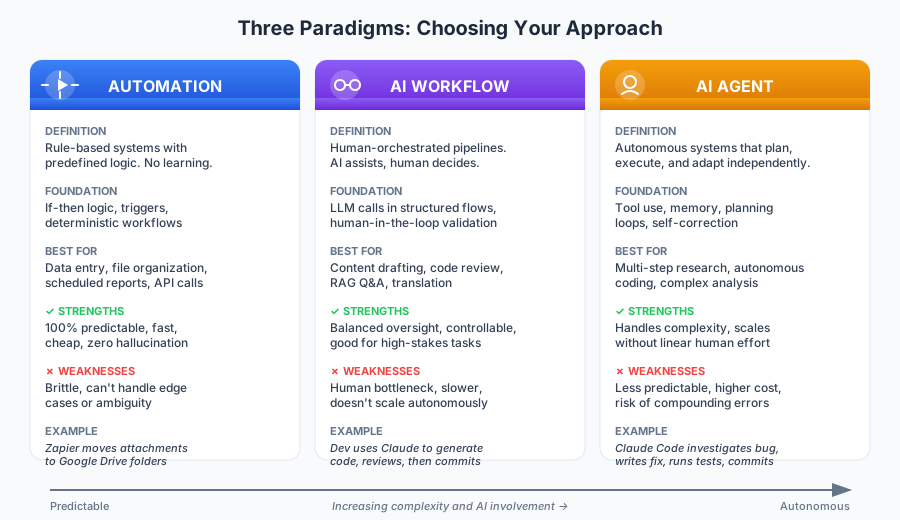
Before selecting a model, you need to select a paradigm. These represent fundamentally different approaches to AI-assisted work. Each has a place. None is universally superior.
Automation
Definition: Rule-based systems that execute predefined logic without learning or adapting.
Core foundation: If-then logic, triggers, deterministic workflows. The system does exactly what you programmed. Every time. No exceptions.
Tasks: Data entry, file organization, scheduled reports, form submissions, repetitive API calls. Anything where the input format is predictable and the output is predetermined.
Strengths:
- 100% predictable behavior
- Fast execution (milliseconds, not seconds)
- Cheap (no API costs per operation)
- Easy to debug (trace the logic path)
- Zero hallucination risk
Weaknesses:
- Brittle when inputs deviate from expected formats
- Can’t handle ambiguity or edge cases
- Requires manual updates when requirements change
- No capacity for judgment calls
Example: A Zapier workflow that moves email attachments matching specific file types to designated Google Drive folders. The trigger fires, the condition checks, the action executes. No AI involved.
When to use: The task has clear rules, predictable inputs, and you need 100% reliability. If you can write a flowchart that covers every case, automation wins.
AI Workflow
Definition: Human-orchestrated pipelines where AI handles specific steps under human direction.
Core foundation: LLM calls embedded in structured workflows. The human remains in the loop for decisions. AI generates, human validates. AI suggests, human approves.
Tasks: Content drafting with human review, code generation with developer approval, summarization pipelines, RAG-based Q&A, translation with quality checks.
Strengths:
- Balances AI capability with human oversight
- Controllable output quality
- Good for high-stakes tasks where errors are costly
- Transparent reasoning (you see the AI’s output before it matters)
- Scales human expertise across more work
Weaknesses:
- Slower due to human bottleneck
- Requires workflow design expertise
- Doesn’t scale autonomously
- Human fatigue can compromise quality over time
Example: A developer uses Claude to generate a function. They review the output, request specific edits, run the tests, then commit. AI assists with the heavy lifting. Human makes the final call.
When to use: The task benefits from AI capability but requires human judgment. The stakes are high enough that you can’t afford unchecked AI output. You have the bandwidth for human review.
AI Agent
Definition: Autonomous systems that plan, execute, and adapt across multiple steps with minimal human intervention.
Core foundation: Tool use, memory, planning loops, self-correction. The LLM acts as the “brain” coordinating actions across tools and APIs. It breaks down goals, executes steps, evaluates results, and adjusts.
Tasks: Multi-step research, autonomous coding with test validation, complex data analysis, end-to-end task completion, investigation and diagnosis.
Strengths:
- Handles complex, multi-step tasks that would exhaust human attention
- Scales without linear increases in human effort
- Can recover from errors and adapt to unexpected situations
- Maintains context across long task sequences
- Unlocks work that was previously too tedious to attempt
Weaknesses:
- Less predictable than human-in-the-loop workflows
- Higher cost (multiple LLM calls, tool invocations)
- Harder to debug when things go wrong
- Risk of compounding errors across steps
- Requires robust guardrails and monitoring
Example: Claude Code investigates a bug report. It reads the error logs, traces the code path across multiple files, identifies the root cause, writes a fix, runs the test suite, and prepares a commit. Human approval comes only at the end.
When to use: The task involves many steps that don’t require individual human judgment. You have guardrails in place (tests, validation, rollback capability). The cost of autonomous operation is lower than the cost of human attention on every step.
Choosing Between Paradigms
The right choice depends on three factors:
-
Predictability of inputs: If inputs are structured and consistent, automation works. If inputs vary widely, you need AI.
-
Stakes of errors: If a mistake costs you $100,000 or a customer relationship, keep humans in the loop. If a mistake costs you a retry, agents can handle it.
-
Required autonomy: If the task needs judgment calls every few steps, use workflows. If judgment is needed only at checkpoints, agents scale better.
Most teams should default to AI workflows and graduate to agents only for tasks where they’ve built confidence through iteration.
The Task Complexity Spectrum
Tasks exist on a spectrum. Low complexity tasks have structured inputs, clear outputs, and minimal reasoning requirements. High complexity tasks are open-ended, require planning, and demand error recovery.
Low complexity: Classification, extraction, formatting, simple Q&A with clear answers. The model needs to understand the input and produce a predictable output. A well-crafted prompt handles most edge cases.
Medium complexity: Summarization, code completion, Q&A with context, translation with nuance. The model needs contextual understanding and some reasoning. Multiple valid outputs exist. Quality varies with model capability.
High complexity: Autonomous research, multi-file refactoring, novel problem-solving, long-horizon planning. The model needs to maintain state, use tools, recover from dead ends, and synthesize information across many sources.
Here’s the thing: these levels don’t map cleanly to model tiers. A Haiku-class model handles low complexity tasks as well as Opus. Sometimes better, because smaller models are less likely to overthink simple problems.
Why Overpowered Models Backfire
Reaching for the most capable model on every task creates real problems.
Cost waste: GPT-5 costs 20x more than smaller models per token. Claude Opus 4.5 costs 15x more than Haiku. If you’re processing 10,000 support tickets through Opus when Haiku would suffice, you’re burning money.
Latency issues: Larger models are slower. For interactive applications, the difference between 200ms and 2 seconds changes user experience fundamentally.
Overconfident outputs: Powerful models are trained to be helpful. On simple tasks, this helpfulness manifests as unnecessary elaboration, unsolicited suggestions, and confident assertions about things you didn’t ask.
The sledgehammer problem: When all you have is GPT-5, everything looks like it needs GPT-5. You stop designing efficient workflows because the model can brute-force through bad prompts.
Why Underpowered Models Fail
The opposite mistake is equally common. Teams try to save money by using small models on tasks that require more capability.
Hallucination increases: Smaller models have less internal knowledge and weaker reasoning. They fill gaps with plausible-sounding fabrication.
Instruction following degrades: Complex prompts with multiple requirements overwhelm smaller models. They’ll nail 3 out of 5 instructions and silently drop the rest.
Context limits become bottlenecks: A 4K context window can’t hold a meaningful codebase. You end up chunking and losing coherence.
Subtlety is lost: Smaller models miss implications, ignore tone requirements, and flatten nuance. Fine for data extraction. Bad for anything requiring judgment.
The hard part is finding the minimum viable model for each task. This requires testing, not guessing.
Matching Models to Task Types
Different tasks demand different capabilities. Here’s how to think about selection:
Coding Tasks
What matters: Reasoning depth, instruction following, tool use capability, knowledge of programming patterns.
Where to look: SWE-bench Verified (swebench.com) measures real-world bug fixing on open-source repos. This is the gold standard for coding capability because it tests actual software engineering, not isolated algorithm puzzles.
Current leaders (as of December 2025): Claude Opus 4.5 and Sonnet, GPT-5 Codex, Gemini 3 Pro, Kimi 2.5. For simpler code generation (boilerplate, formatting, simple functions), Haiku or Gemini Flash often suffice.
Image Generation
What matters: Visual quality, style control, prompt adherence, consistency across generations.
Where to look: This space moves fast. Current outputs from Midjourney v6, DALL-E 3, and Stable Diffusion 3 represent different tradeoffs between quality, control, and cost.
Selection factors: Midjourney for aesthetic quality. DALL-E 3 for prompt following. Stable Diffusion for local control and customization.
Research and Analysis
What matters: Long context handling, factual grounding, citation capability, synthesis across sources.
Where to look: The Vellum AI Leaderboard (vellum.ai/llm-leaderboard) aggregates multiple benchmarks and provides a useful general comparison.
Current leaders (as of December 2025): Claude Opus 4.5’s 200K context window makes it strong for long documents. Gemini 3 handles up to 2M tokens. Kimi 2.5 excels at long-context tasks. Perplexity specializes in research with built-in search.
Simple Classification and Extraction
What matters: Speed, cost, consistency. Capability ceiling is less important than reliability floor.
Best choices: Claude Haiku, Gemini Flash, GLM 4.7 Lite. These models cost pennies per thousand calls and respond in milliseconds. For structured extraction with clear schemas, they match larger model accuracy.
Creative Writing
What matters: Voice consistency, narrative coherence, stylistic range.
Selection factors: This is subjective. Claude tends toward measured, thoughtful prose. GPT-5 produces more varied styles. Test on your specific use case.
Using Benchmarks Wisely
Benchmarks measure specific capabilities. A model that tops SWE-bench may rank fifth on creative writing. A model with the best MMLU score may struggle with long-context tasks.
The Vellum Leaderboard aggregates scores across multiple benchmarks. It’s useful for general capability comparison but hides task-specific variation.
SWE-bench Verified tests real software engineering tasks. Models must fix actual bugs in real codebases. This matters because coding benchmarks that test isolated problems (HumanEval, MBPP) don’t capture the difficulty of navigating large projects.
What benchmarks miss:
- Latency and throughput
- Cost per task
- Reliability under load
- Behavior on your specific domain
- Integration complexity
Treat benchmarks as a starting filter. They tell you which models are worth testing. They don’t tell you which model wins for your use case.
Provider Considerations Beyond Performance
Raw capability is one factor. Production deployment requires more.
API reliability: Does the provider maintain uptime during traffic spikes? What’s their historical incident rate?
Rate limits: Can you scale to your expected volume? What happens when you hit limits?
Pricing structure: Input and output tokens are priced differently. Caching, batching, and fine-tuned models have different economics.
Context window: 32K, 128K, 200K, 1M, 2M. The right size depends on your task. Bigger isn’t always better (longer contexts increase cost and latency).
Tool use support: If you’re building agents, native function calling matters. Some providers handle this better than others.
Fine-tuning availability: Can you train on your data? What’s the minimum dataset size? What does it cost?
Data privacy: Where is data processed? Is it retained? What compliance certifications does the provider hold?
The Harness Mindset
Here’s the mental shift that separates good practitioners from great ones. Stop asking “what’s the best model?” Start asking “what’s the best model for this task?”
Treat models like tools in a workshop. A table saw and a hand saw both cut wood. One isn’t better than the other. They’re suited for different jobs. A master carpenter reaches for the right tool without thinking. You should reach for the right model the same way.
Here’s what this looks like in practice. A developer building an AI-assisted research tool might use:
| Task | Model | Why |
|---|---|---|
| Deep research and synthesis | Gemini 3 Deep Research | 2M token context, built for long-form analysis across many sources |
| Code generation and debugging | Claude Opus 4.5 or GPT-5 Codex | Top SWE-bench performers, strong reasoning and tool use |
| Real-time news and current events | Grok | Native X/Twitter integration, real-time information access |
| Quick classification and routing | Gemini Flash or Claude Haiku | Fast, cheap, reliable for structured tasks |
| Image generation for diagrams | DALL-E or Midjourney | Purpose-built for visual output |
That’s five different models in one application. Each chosen for what it does best. The developer who uses Opus for everything pays 15x more for their classification layer and gets worse real-time results than Grok. The developer who uses Haiku for everything gets fast responses but shallow research and buggy code.
Build workflows that can swap models. Abstract your LLM calls behind interfaces. Make model selection a configuration choice, not a code change. This lets you test alternatives and route dynamically.
Use routing logic. Simple tasks go to fast, cheap models. Complex tasks go to capable, expensive models. A classification layer at the front of your pipeline can save significant cost with no quality loss.
Test empirically. Benchmarks are starting points. Your domain has quirks that benchmarks don’t capture. Run 50 examples from your actual use case through candidate models. Measure what matters to you.
A Framework for Selection
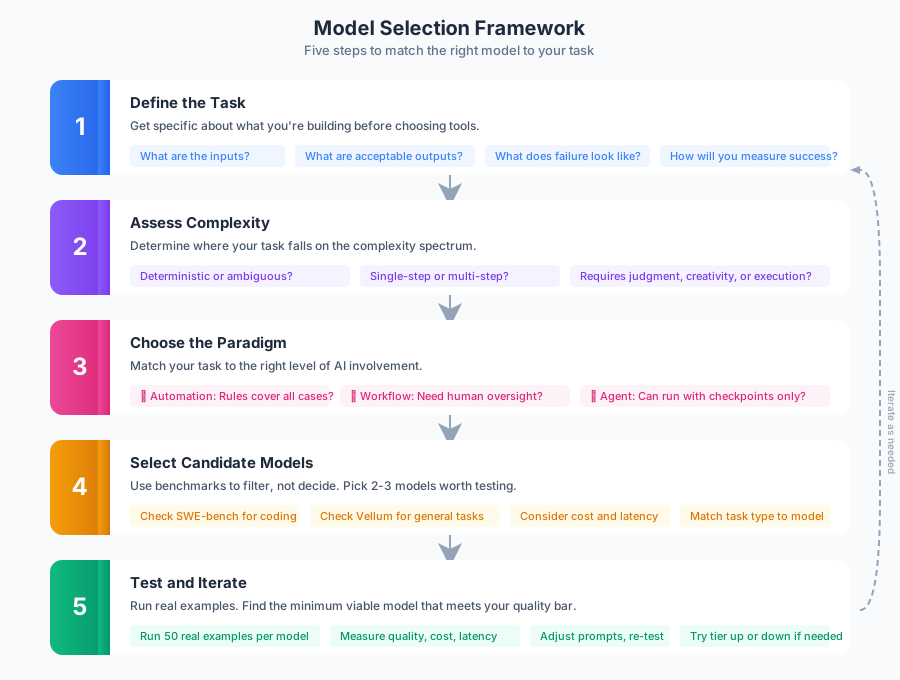
When you’re facing a new AI task, work through these steps:
1. Define the task clearly. What are the inputs? What are the acceptable outputs? What does failure look like? How will you know if it worked?
2. Assess complexity. Is the task deterministic or ambiguous? Single-step or multi-step? Bounded or open-ended? Does it require judgment, creativity, or just execution?
3. Choose the paradigm. Can automation handle it? Does it need AI with human oversight? Can an agent run autonomously with checkpoint approval?
4. Select candidate models. Based on task type, identify 2-3 models worth testing. Use benchmarks to filter, but don’t rely on them to decide.
5. Test and iterate. Run real examples. Measure quality, cost, latency. Adjust prompts. Try the next model tier up or down. Find the minimum viable model that meets your quality bar.
This process takes a few hours. It saves weeks of debugging and thousands in unnecessary API costs.
Best Practices and Guardrails
Do:
- Start with the smallest model that might work, then scale up if needed
- Measure cost per task, not just cost per token
- Build model-agnostic abstractions in your code
- Log inputs, outputs, and model versions for debugging
- Set up alerts for quality degradation and cost spikes
- Review a sample of AI outputs regularly, even for automated pipelines
Don’t:
- Default to the most powerful model without testing alternatives
- Assume benchmark rankings translate to your use case
- Ignore latency in user-facing applications
- Skip human review for high-stakes outputs
- Lock yourself into a single provider
- Trust marketing claims over empirical testing
Moving Forward
Pick one task you’re currently handling with AI. Run it through the framework. Identify your current model, assess whether it matches the task complexity, and test one alternative.
If you’re using GPT-5 for everything, try Gemini Flash or Haiku on your simplest tasks. If you’re building agents, make sure you’ve validated the underlying model on your specific domain before letting it run autonomously.
The teams I’ve watched succeed with AI share one trait: they treat model selection as an engineering decision, not a default. They test, measure, and iterate. They match intelligence to complexity with intention.
That intention is the difference between AI that helps and AI that costs.
Related Articles
Structured Outputs in LLMs: Reliable Data for Real Pipelines
January 17, 2026
Structured outputs turn LLM text into dependable, validated data. Learn schemas, validation loops, and practical patterns for extraction, routing, and ETL.
AI-Assisted Coding in 2025
October 19, 2025
How AI is actually changing software development—from what I've seen in the wild and what's working versus what's hype.
Enterprise Best Practices for AI-Assisted Software Engineering Teams
February 1, 2026
AI tooling can speed up enterprise engineering teams, but only with the right guardrails. A practical guide to prompting, context management, governance, and parallelization across Claude, Copilot, and CLI tools.
Wrestling with a technical challenge?
I help companies automate complex workflows, integrate AI into their stacks, and build scalable cloud architectures.