Ben Swerdlow published a piece called AI Code that hit the Hacker News front page with 170 points and 103 comments. The core argument: the design rules that keep a human-authored codebase healthy are the same rules that keep an AI-assisted codebase healthy. And AI tools break them faster than humans do if nobody’s paying attention.
Swerdlow lays out a framework that’s worth knowing even if you never read the full piece. Code should be self-documenting. Functions fall into two categories: semantic functions (pure, testable, self-documenting through naming and structure) and pragmatic functions (production wrappers that handle the messy real-world logic). Models should prevent impossible states — every optional field you add is a question the rest of the codebase has to answer every time it touches that data. And the degradation pattern is predictable: semantic functions gradually accumulate side effects until they become pragmatic ones, and models accumulate optional fields until they’re a loose bag of half-related data where every consumer has to guess which fields are actually set.
None of this is new. Good engineers have followed these rules for years. What’s new is the speed at which AI tools violate them.
The Coherence Tax: When Vibe Coding Meets Production Codebases
Vibe coding — describing what you want in natural language and letting AI generate the implementation — has gone mainstream. The productivity gains are real. But vibe coding without guardrails is how codebases drift, and the drift is harder to detect than traditional technical debt because the code works perfectly on day one.
Your team adopted Cursor, Claude Code, or Copilot sometime in the last 6-12 months. PRs are up, cycle time dropped, and the dashboards look great.
Then someone opens a service they haven’t touched in a few weeks and finds three different error handling patterns. A semantic function that used to be pure now has side effects because the AI added logging and a cache check. A model that started with five well-defined fields now has eight, three of them optional, and nobody can remember what state they’re supposed to represent.
This is exactly the degradation Swerdlow describes. Semantic functions drift into pragmatic ones. Models accumulate optional fields until they’re ambiguous. The difference is speed — AI tools accelerate this drift from months to weeks.
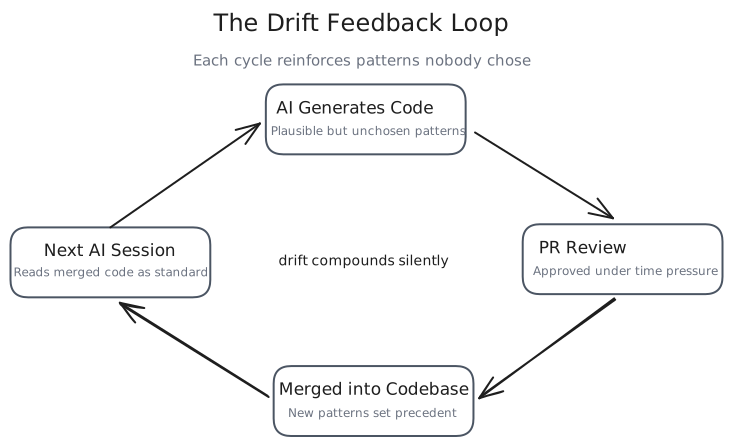
None of it shows up in your metrics. The tests pass and the linter is clean. The PR got approved because the reviewer saw working code and didn’t want to be the person who slowed the team down over style.
That’s the coherence tax.
Why “Just Review It Harder” Doesn’t Scale
The standard response is to lean on code review. Catch the drift in PR review. Be more careful. (You can probably guess how well this works at scale.)
This still happened when humans wrote all the code. However, a reviewer could reconstruct the author’s reasoning because the author was a person on the team who made deliberate choices. You could ask “why did you do it this way?” and get an answer rooted in the project’s history.
AI-generated code short-circuits that loop. The code works, but it doesn’t carry intent. The reviewer faces a quiet choice on every AI-assisted PR: spend 20 minutes tracing why the AI structured it this way, or approve it because the tests pass and move on. You’ve already been messaged twice that this is URGENT (we have a release pending!)
At mid-market scale (10-50 engineers), every approval sets a precedent. The next AI session reads that merged code as an example of how things are done here. Three months of these micro-approvals and your codebase has absorbed patterns nobody chose.
The cost surfaces later. Someone needs to modify a module written by AI six months ago but they can’t figure out why it’s structured the way it is, because nobody decided it should be. The AI chose that structure based on whatever context it had that day.
The reasoning is gone.
Convention Files as Architectural Guardrails
Every major AI coding tool supports a persistent instruction file: CLAUDE.md for Claude Code, .cursor/rules for Cursor, .github/copilot-instructions.md for Copilot. These files load at session start and shape every piece of code the tool generates.
Most teams either don’t have one or treat it like a README. Both are wrong. (If yours is a copy-paste of your project’s actual README, that counts as not having one.)
A convention file is an operating agreement (contract) between your team and every AI tool that touches the codebase. When it works, it constrains generation toward your blessed patterns instead of letting the AI freestyle from whatever it saw last. When it’s missing, every AI session starts from zero and makes its own architectural choices.
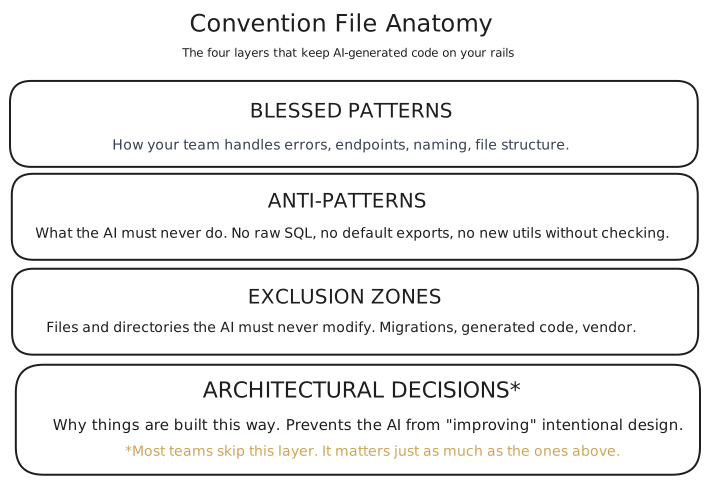
What belongs in a convention file:
- Blessed patterns - How your team handles errors, structures API endpoints, names things, organizes files. Not “best practices.” Your specific patterns, documented explicitly enough that an AI can follow them.
- Explicit anti-patterns - What the AI should never do. No raw SQL (use the ORM). No default exports. No new utility files without checking if one exists. The anti-patterns matter more than the patterns because AI tools don’t know your history of past mistakes.
- Exclusion zones — files and directories the AI should never modify. Generated code, migration files, vendor directories. Without an explicit list, the AI treats everything as fair game.
- And the one most teams skip: architectural decisions. Why things are built this way, not just what the structure is. When the AI encounters a pattern it doesn’t understand, an ADR reference prevents it from “improving” something that was designed that way for a reason.
Writing a convention file forces your team to articulate standards that were previously tribal knowledge.
I covered the mechanics of CLAUDE.md patterns in depth in my context engineering post, including the primacy problem (instructions at line 300 of a bloated config file are functionally invisible) and routing strategies for large codebases. The patterns in that piece apply directly here, at team scale.
AI-Aware Code Review
Standard code review asks: does this work? Is it readable? Does it follow our patterns?
AI-generated code needs three additional questions:
1. Could a team member who didn’t write this explain the approach in 60 seconds?
If the answer is no, the code might work perfectly but it’s not maintainable by your team. AI-generated code sometimes uses patterns that are technically valid but alien to how your team thinks about the problem. A brilliant solution nobody understands is a liability.
2. Does this follow our blessed patterns, or does it introduce a new one?
This is to detect drift. AI tools are creative by default. They’ll invent a new approach to error handling if the prompt is ambiguous about which existing approach to use. Catching these at review time is cheaper than untangling them later.
3. If you deleted this and asked a different AI to rebuild it from the same spec, would you get something structurally similar?
This is test coherence. If the answer is yes, the code reflects your architecture. If the answer is no, it reflects the AI’s arbitrary choice, shaped by whatever happened to be in the context window that day. Arbitrary choices pile up.
These three questions add maybe 5 minutes per review. The alternative is silent drift that compounds over every sprint.
Pattern Libraries That Constrain Generation
Convention files tell the AI what rules to follow. Pattern libraries show the AI what good output looks like.
The idea is simple: for every common task your team performs (adding an API endpoint, writing a database migration, creating an error handler, structuring a test file), maintain one reference implementation that represents the way your team does it. When the AI generates new code for that task, it works from your example instead of from its training data.
This is different from documentation. Documentation explains why. A pattern library provides a concrete template the AI can match against. The distinction matters because AI tools are better at “make something like this” than “follow these abstract rules.”
The golden path approach works like this: pick your most common development tasks. For each one, find the best existing implementation in your codebase. Clean it up if needed. Put it in a patterns/ or examples/ directory that your convention file references. When an engineer starts a new feature, the AI sees both the convention rules and a concrete example of what the output should look like. (This is the “show, don’t tell” principle applied to AI tooling — and it works better than I expected it to.)
The payoff shows up in review burden. When AI-generated code follows a known pattern, reviewers can spot deviations immediately. When every AI session invents its own approach, every review is a first-time read.
I’ve found that error handling and API endpoint patterns are the best place to start (they’re the highest-volume tasks where drift causes the most confusion). Database and test structure are natural additions after that. You don’t need to cover every case on day one. Five patterns that handle 60-70% of daily work produce outsized consistency gains.
What This Looks Like in Practice
Here’s what this looked like in my own setup.
I run an Obsidian vault with nested CLAUDE.md files, agent definitions, and rule files that constrain how AI tools interact with the project. Before I wrote those, every Claude Code session invented its own approach to file organization, naming, and linking conventions. I’d come back the next day and find files created in the wrong directories, frontmatter fields that didn’t match the schema, and content that ignored conventions I’d been following for weeks.
The pattern scales to teams the same way. Add a convention file, create reference patterns for your highest-volume tasks, and add the three review questions to your PR template. The throughput stays roughly the same. The difference is that AI-generated code now looks like the rest of the codebase instead of looking like a different team wrote it.
The time investment is small(-ish). Typically 2-3 hours for the convention file (most of that is the team conversation about what the conventions actually are/should be). Another 1-2 hours to identify and clean up reference patterns. Updating the review checklist takes 15 minutes. Ongoing maintenance runs about 15-20 minutes per sprint.
The Deeper Problem: Code Nobody Understands
The HN thread surfaced something that goes beyond style drift. Multiple commenters described a specific failure mode: AI-generated code that works correctly, passes every test, and cannot be understood by anyone on the team six months later.
In my opinion, this is worse than buggy code. Code that works but carries no legible intent is invisible debt. It sits in the codebase, doing its job, until someone needs to change it. Then it becomes a research project instead of a modification. Especially when a customer needs a change quickly and they are requesting a root cause analysis (RCA) to go along with it.
Convention files and pattern libraries help because they constrain the AI’s structural choices. But they don’t fully solve the understanding gap. That gap is a team discipline problem.
Two practices that help:
Require AI-generated code to be explainable by the person who prompted it. If a developer can’t walk through the logic of what they shipped, they don’t understand their own PR. This isn’t about shaming anyone — it’s about maintaining the team’s collective understanding of the system. The developer who prompted the code is the only person who can bridge the gap between “the AI wrote this” and “here’s why it works this way.”
Convention files need to be living architecture documents, not one-time artifacts. Update them when new patterns emerge, remove patterns that no longer apply, and review them at the same cadence you review your architecture. Teams that write a convention file once and never touch it end up with the same problem they started with, just one layer removed.
Getting Started This Week
If your team is using AI coding tools without explicit guardrails, you already have this problem. The question is how deep it runs.
Start here:
Pick one service or module. Read through the last 20 PRs. Count the number of distinct patterns for the same operation (error handling, data validation, API response formatting). If you find more than two, your codebase has already started drifting.
Then write your convention file. It doesn’t need to be comprehensive on day one. Start with anti-patterns, because those prevent the worst drift. Add blessed patterns for your three highest-volume tasks. Reference your existing context engineering setup if you have one, or build it from scratch using the four-layer model.
Add the three review questions to your PR template. This takes 15 minutes and changes the conversation from “does it work” to “does it belong.”
The tools will keep getting better. The code they generate will keep getting more plausible. Vibe coding best practices will evolve as the tooling matures, but the fundamentals won’t change: constrain generation, review for coherence, and maintain understanding. Enterprise governance patterns, the shift to agentic workflows, and multi-agent orchestration all make this more urgent, not less. More agents generating more code means more surface area for drift.
The teams that build these guardrails now will compound that advantage every sprint. The ones that don’t will keep wondering why their AI tools feel slower than they used to.
I write about my experiences with AI engineering and automation every couple weeks. Subscribe to the newsletter if you want it in your inbox.
References
- Ben Swerdlow, “AI Code” — the source article on semantic vs. pragmatic functions, model degradation, and intentional codebase design with AI tools. Read this first if you haven’t.
- HN discussion (170 points, 103 comments) — community response to Swerdlow’s piece
- Related: Context Engineering for AI Coding Tools — the foundational discipline this post builds on
- Related: Enterprise Best Practices for AI-Assisted Software Engineering Teams — governance at scale
- Related: From Vibe Coding to Agentic Engineering — the paradigm shift that created this problem