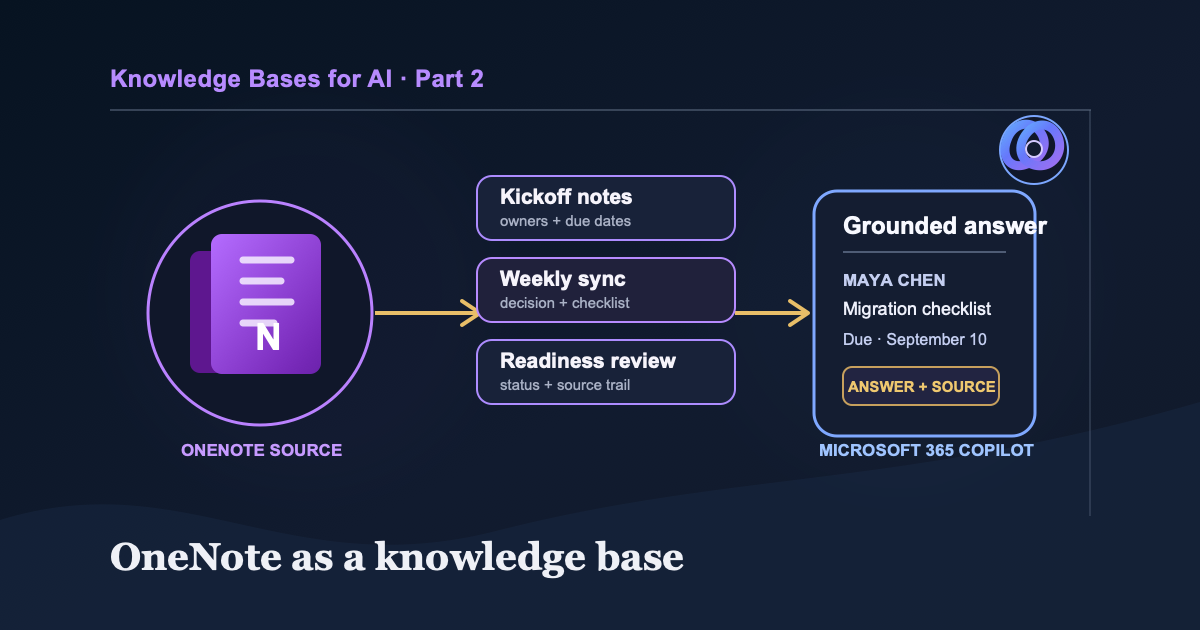
A company brain doesn’t need to be complicated. At the minimum, you need a file system your AI can access and an LLM that can read what it finds. This is Part 2 of a four-part series covering GitHub, Microsoft 365 Copilot with OneNote, Obsidian, and a managed RAG system on AWS.
For many companies, that file system isn’t GitHub. It’s a shared OneNote full of meeting notes, project handoffs, owners, deadlines, and details everyone assumes someone else remembers.
Those notes can become shared AI context without exporting the notebook or building a vector database. The first job is simpler: organize the pages so a person or Copilot can find the decision, identify its owner, and admit when the answer was never recorded.
Part one started with direct search in a GitHub repository. This part applies the same idea inside Microsoft 365.
OneNote pages
        ↓ Microsoft-managed retrieval
Notes the user can access
        ↓ Copilot response
Answer linked back to its meeting page
OneNote Notebooks and Copilot Notebooks
Microsoft uses similar names for two different products.
A OneNote notebook is the familiar collection of sections and pages used for long-term notes. In supported clients, Copilot in OneNote can summarize notes, create task lists, rewrite content, and answer questions in a pane.
A Microsoft 365 Copilot Notebook is a separate workspace for a project and a selected set of references. It can collect Word documents, PowerPoint decks, links, Copilot chats, and other material around one task. Microsoft has also begun making Copilot Notebooks available inside OneNote.
This article starts with an ordinary OneNote notebook because that is where many teams already keep their material. Add a Copilot Notebook later when a project needs a narrower reference set. Microsoft’s comparison of OneNote and Copilot Notebooks explains the distinction.
Copilot in OneNote varies by license, client, platform, and tenant configuration. Check Microsoft’s current OneNote Copilot requirements in the environment your team uses.
Start Where the Team Already Works
OneNote is a good starting point when:
- the team wants to use its existing notes before adopting a new system
- people already take meeting notes there
- the notebook is shared with the same group that needs the answers
- decisions, owners, and dates are more important than source-code history
- Microsoft 365 is already the organization’s identity and permission boundary
- the main problem is finding existing context, not building a custom retrieval system
Skip this approach when you need plain-text portability, Git-style review, custom ingestion, or precise control over how content is indexed. A Markdown vault or repository will fit those requirements better.
Keep the Notebook Structure Simple
Most shared notebooks are updated between meetings. A structure that needs a training session will not survive long.
Start with four sections:
Project Atlas
├── 01 Active Work
├── 02 Meetings
├── 03 Decisions and Reference
└── 99 Archive
Active Work holds current plans. Meetings keeps dated notes. Decisions and Reference holds material the team will need after the current sprint or quarter. Archive moves old work aside without deleting it.
Consistency beats elaborate categories. Give project decisions one obvious home.
That is how a meeting notebook becomes company memory instead of a pile of personal notes.
Build the Smallest Shared Version
- Create a notebook in the OneDrive or SharePoint location your team already controls.
- Add the four sections above and the three Project Atlas pages below.
- Share the notebook with the people who need the answers. Give edit access only to maintainers; every reader still needs permission to open the notebook.
- Sign in as a normal team member and open the notebook before testing Copilot. If that person cannot read a page directly, Copilot should not be your workaround.
That is enough for the file-system side of the company brain. The next connection is Copilot inside OneNote.
Write Notes for Someone Who Missed the Meeting
Copilot cannot retrieve details that were never recorded. Generic page titles and action items such as “follow up” make the source harder to use later.
Include:
- a title with the project and date
- attendees
- decisions
- action items with one owner and a due date
- unresolved questions
- links to supporting documents
Here is the format used for this demonstration:
# Project Atlas weekly sync - September 3, 2026

Attendees: Maya Chen, Luis Ortega, Priya Shah

## Decisions
The customer migration checklist must be approved by September 18, 2026.

## Action items
- Maya Chen will draft the migration checklist by September 10, 2026.
- Luis Ortega will review security requirements after Maya shares the draft.

## Open questions
- Do we need a separate checklist for regulated customers?
The repeated names and dates are intentional. “September 18, 2026” is clearer than “the 18th,” and “Maya Chen” is clearer than “Maya.” That small amount of repetition prevents ambiguity later.
When Copilot gets an owner or deadline wrong, don’t only fix the answer. Check the source page. A vague title, missing full name, or relative date is a defect in the shared memory, and fixing it helps the next person too.
A Three-Meeting Notebook We Can Test
For a clean example, I would create three synthetic pages in the 02 Meetings section.
Project Atlas kickoff - August 27, 2026
Attendees: Maya Chen, Luis Ortega, Priya Shah

Decision: The pilot will include 20 customer accounts from the North region.

Action items:
- Priya Shah will select the 20 pilot accounts by September 4, 2026.
- Luis Ortega will confirm the data-retention requirements by September 8, 2026.
Project Atlas weekly sync - September 3, 2026
Attendees: Maya Chen, Luis Ortega, Priya Shah

Decision: The customer migration checklist must be approved by September 18, 2026.

Action items:
- Maya Chen will draft the migration checklist by September 10, 2026.
- Luis Ortega will review security requirements after Maya shares the draft.
Project Atlas readiness review - September 10, 2026
Attendees: Maya Chen, Luis Ortega, Priya Shah

Update: Priya selected the 20 North region pilot accounts.

Decision: The pilot launch remains scheduled for September 24, 2026.

Open question: The team has not decided whether regulated customers need a separate checklist.
These pages are short enough to check by hand. When an answer looks wrong, compare it with the source instead of searching through a much larger notebook.
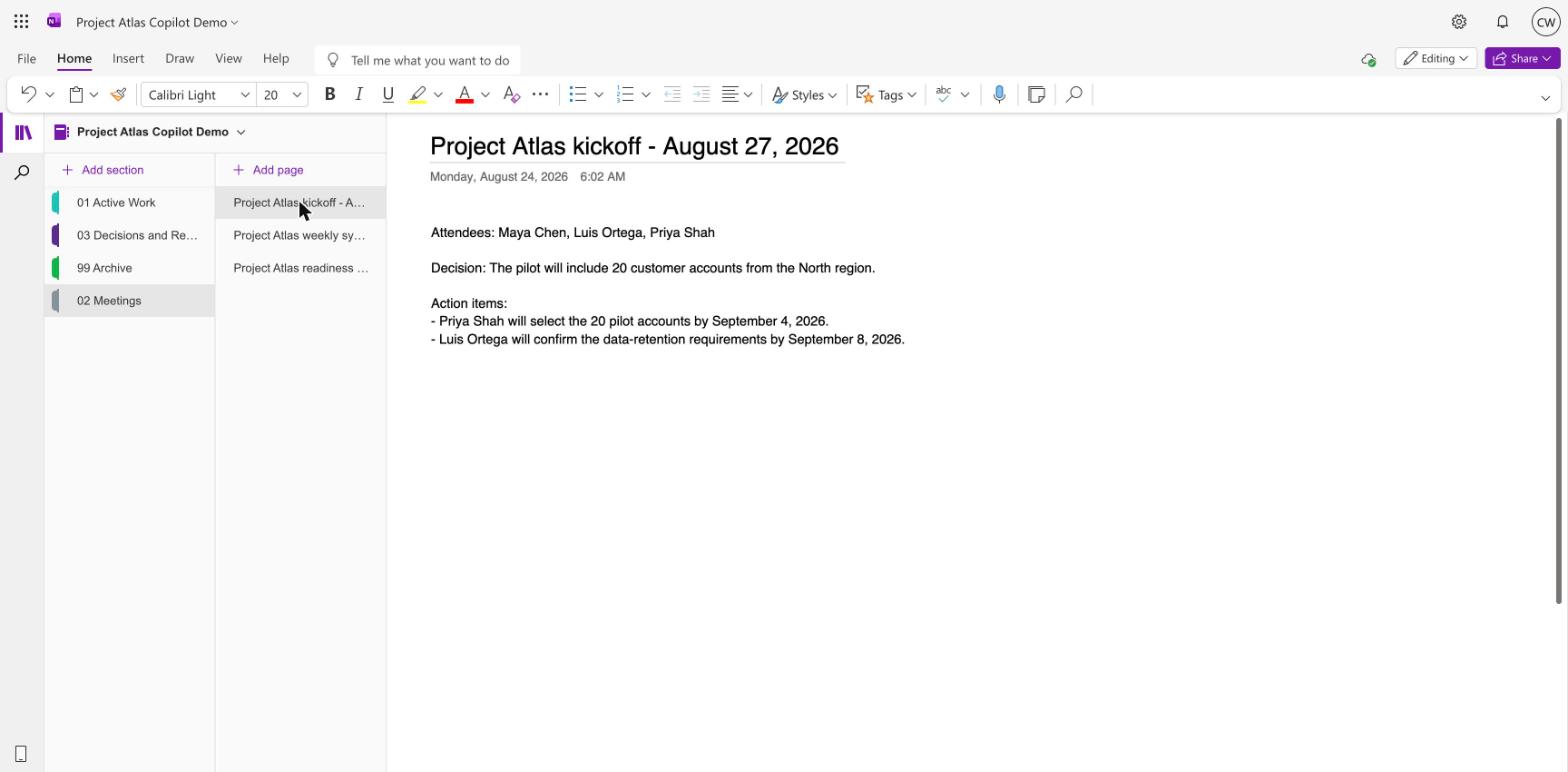
The 02 Meetings section holds the three synthetic Project Atlas pages used for the test.
Connect Copilot to the Notebook
Microsoft currently documents Copilot in OneNote for customers with a Microsoft Copilot (Work) license in OneNote for Microsoft 365 on Windows, Mac, iPad, and the web. An eligible Microsoft 365 subscription can also provide it in OneNote for Windows. Check the current OneNote Copilot requirements in your tenant before building around it.
Open the shared notebook, select 02 Meetings, then choose Home > Copilot. Microsoft says Copilot can summarize an entire section by default, so keeping the three test pages in one section gives it a bounded source set. Run the prompts below and require the response to name the meeting pages it used. Open those pages yourself and compare the owners, dates, and decisions before treating the answer as grounded.
My account could not complete that live path. The OneNote web client did not expose a Copilot pane, and the available Microsoft 365 Copilot Chat surface was labeled Copilot Chat (Basic). It could not open the notebook from its SharePoint link or accept it through the cloud-file picker.
The screenshots below therefore show the three meeting pages pasted into Copilot Chat verbatim. They test answer accuracy and unsupported-answer behavior, not live OneNote or Microsoft Graph retrieval. The setup above is the path Microsoft documents; a live tenant test still needs to confirm it in the environment where the notebook will be used.
Test the Evidence
Use one known answer, one question that spans pages, and one question the notes cannot answer.
1. What do we have due on a specific date?
Prompt:
Based only on the Project Atlas meeting notes in this notebook, what is due on September 10, 2026? Name the owner and point me to the meeting page where it was assigned.
Expected answer: Maya Chen is due to draft the customer migration checklist. The source is Project Atlas weekly sync - September 3, 2026.
This checks whether Copilot can connect a concrete date, the right task, and its owner when the source notes are supplied.
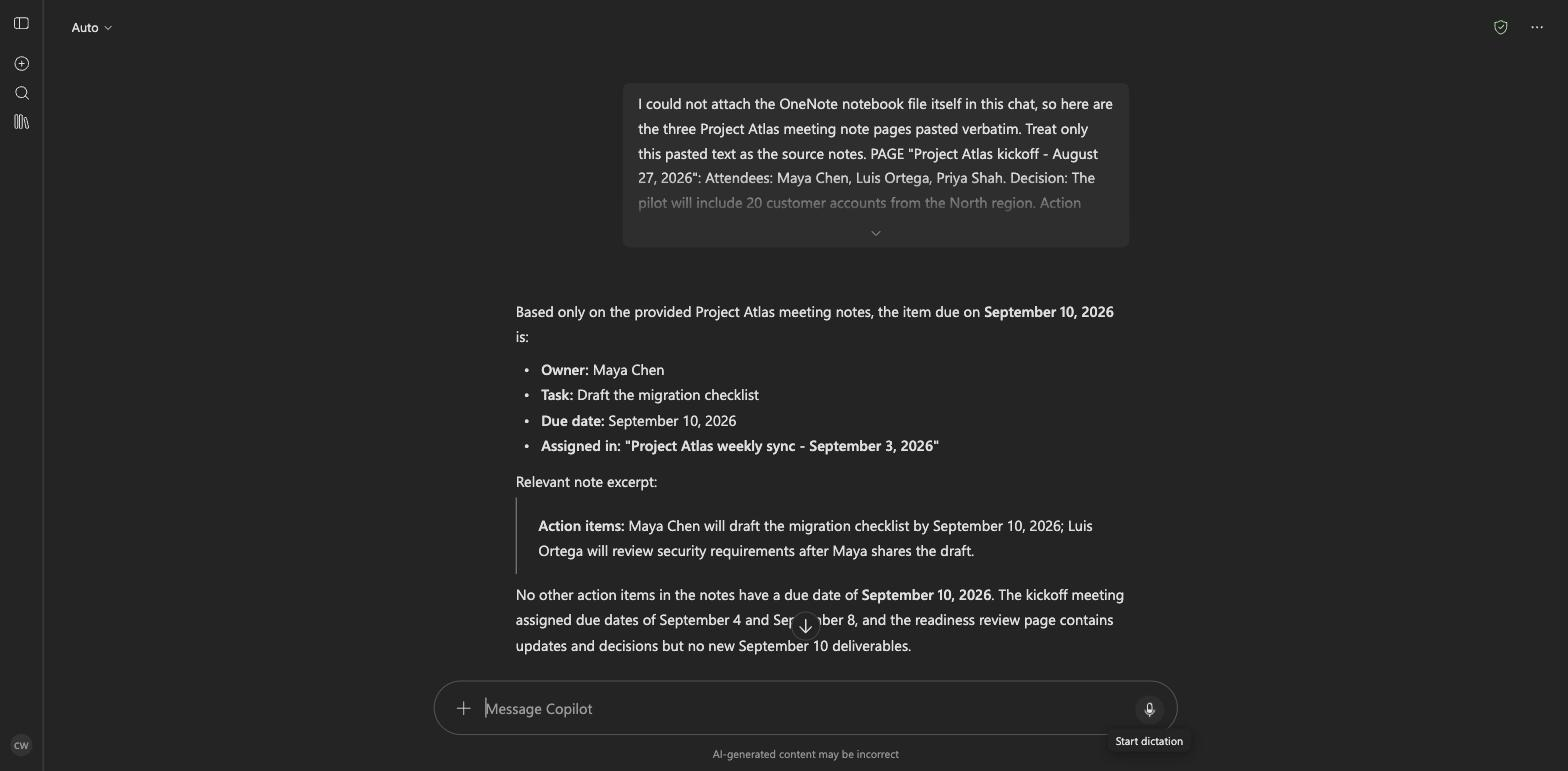
The known-answer response names the owner, task, due date, and assigning meeting page.
2. Who owns the work, and what happened afterward?
Prompt:
Who was responsible for selecting the Project Atlas pilot accounts, when was it due, and do later meeting notes say whether it was completed? Cite the relevant meeting pages.
The kickoff assigned Priya Shah to select the accounts by September 4. The September 10 readiness review says she selected them. Copilot kept those dates separate and cited both pages.
3. Did we discuss something that is not there?
Prompt:
What vendor did the team approve for customer identity verification, and what contract term did we accept? Use only the Project Atlas meeting notes and cite the decision.
None of the three pages mentions an identity-verification vendor or a contract. The right answer is that the meeting notes do not document the decision.
The prompt deliberately limits the evidence to these meeting notes. A vendor name, unrelated citation, or web-derived answer would fail the test.
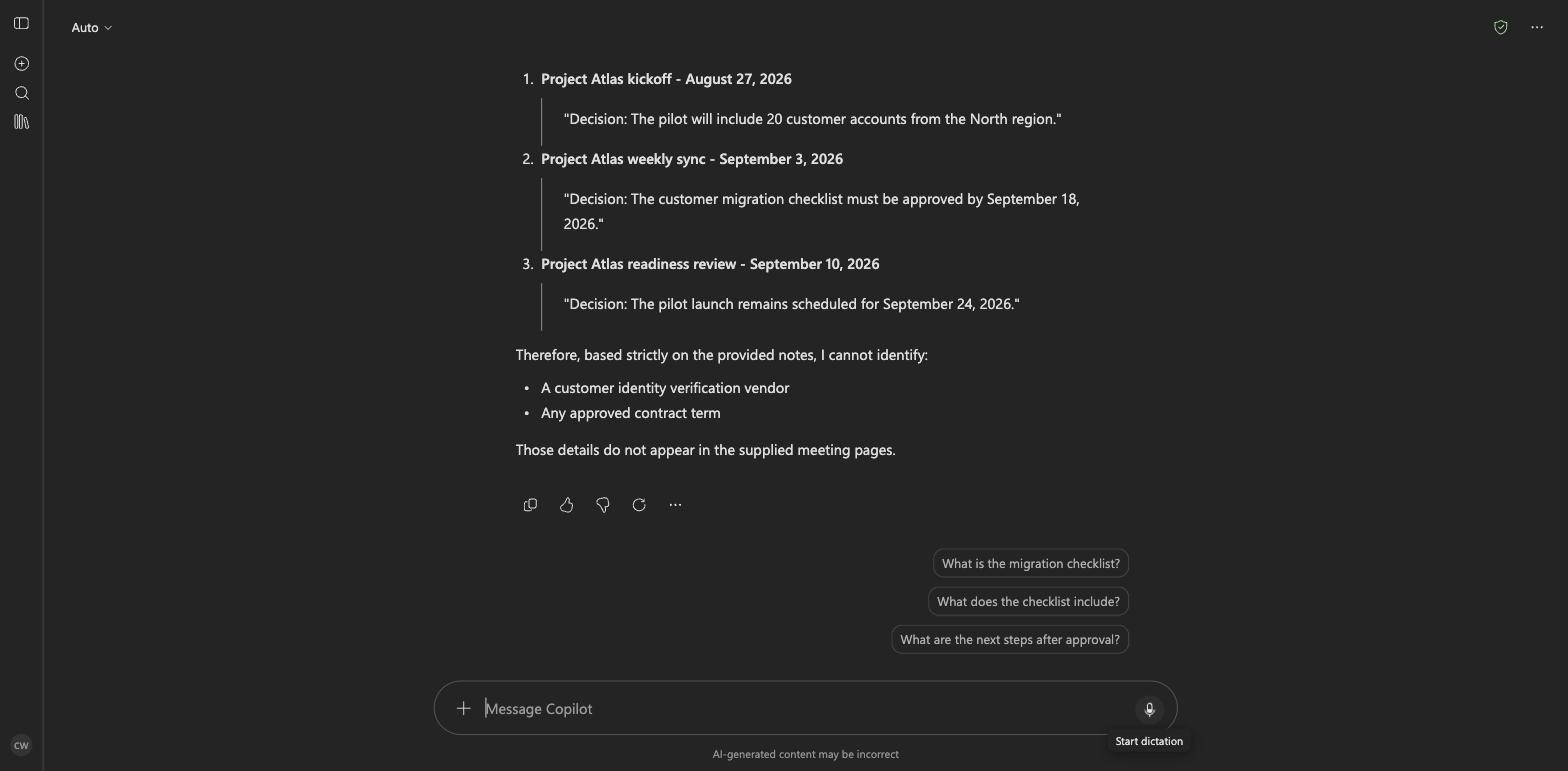
The unsupported-answer response declines to name a vendor or contract term and lists the decisions in the notes.
Keep Permissions Intact
Microsoft 365 provides the permission boundary, provided the notebook is shared deliberately.
One company brain doesn’t mean one permission bucket. Shared memory still needs structural access boundaries.
Copilot should stay within the signed-in user’s permissions. Do not mix HR notes, customer records, legal discussions, or personal working notes into a team notebook for the sake of easier search.
Before using a notebook as shared AI context:
- Review who can open it.
- Remove material that does not belong with that audience.
- Check linked OneDrive and SharePoint files separately.
- Run the same prompts as a normal team member, not only as the owner.
Use separate notebooks when groups need different access. A prompt cannot enforce a security boundary.
Where OneNote Fits
OneNote works well when people within the organization already use it. For teams in Outlook, Teams, SharePoint, and OneDrive, it avoids moving their work into a repository.
The trade-off is control. You don’t choose how retrieval works, and product behavior, licensing, and interface labels change. Free-form pages can suit the people writing them while remaining ambiguous to a retrieval system. Exports and version history are also less flexible than Markdown in Git.
Microsoft documents Copilot in OneNote as a tool for summarizing sections or selected text and creating task lists. That doesn’t prove a notebook will answer your team’s questions. Test the pages, account type, client, and prompts you plan to rely on.
When to Use Something Else
Stay with OneNote when people maintain it, the audience has the right access, and the three-query test produces reliable results. Don’t overengineer the solution.
Choose a Markdown vault when you need direct file access and portability more than Microsoft 365 integration. Use managed RAG when you need repeatable ingestion across many sources, retrieval evaluation, separate access tiers, or an API for several applications.
OneNote can hold the first shared memory layer for a team that already works in Microsoft 365. The test isn’t whether Copilot can summarize a page. It’s whether the team can retrieve a documented decision, connect it to later work, and recognize when the decision was never recorded.
Part three moves the pattern into a Markdown vault, where maps, source rules, recaps, and reusable workflows carry learning from one session into the next.