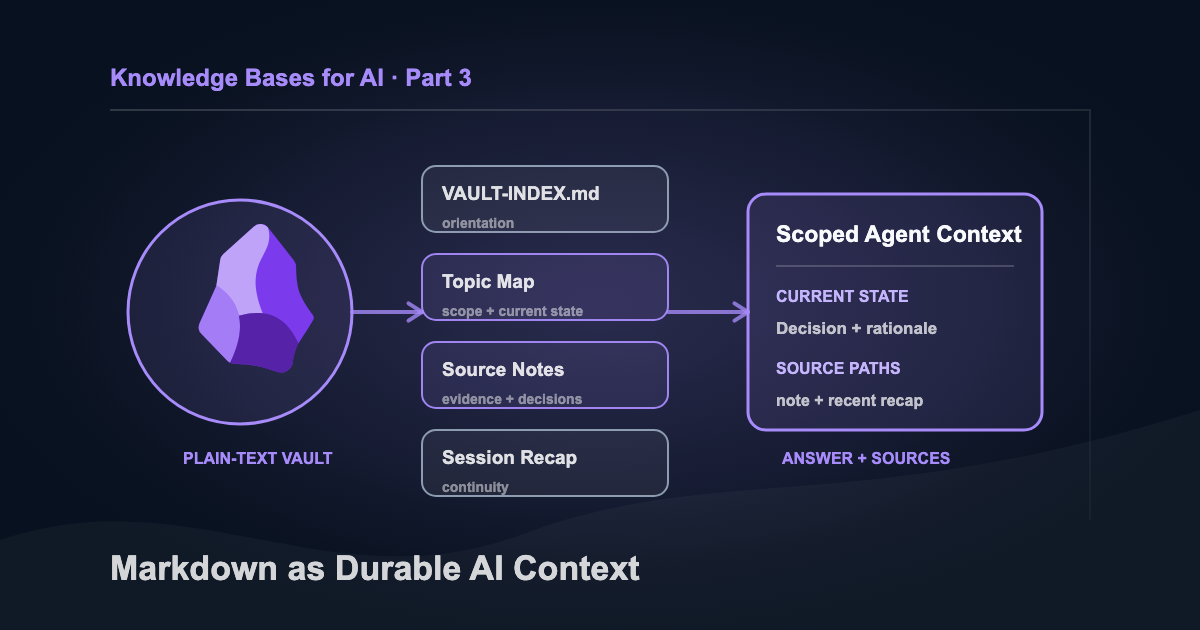
A company brain doesn’t need to be complicated. At the minimum, you need a file system your AI can access and an LLM that can read what it finds. This is Part 3 of a four-part series covering GitHub, Microsoft 365 Copilot with OneNote, Obsidian, and a managed RAG system on AWS.
The first two versions gave AI access to relevant files. My Markdown vault adds the connections: which source owns the current answer, how the pieces fit together, and what I learned from the last piece of work.
I didn’t start with Obsidian because I wanted an AI knowledge base. I had years of notes, research, project decisions, Word documents, and Apple Notes that needed a more organized home. Over time, the vault became the context layer for work happening far beyond Obsidian. I can point an agent toward the relevant area instead of pasting the same background into another chat. It reads the map, opens a few files, and starts with context I’ve already reviewed.
The setup is simple:
Markdown files I maintain
        ↓ scoped file search
Topic map, source notes, and recent recap
        ↓ session context
Answer or edit with source paths
Of the four approaches in this series, this is my favorite. I started using the vault this way around January 2026, and it has become the control layer for work outside Obsidian. The relevant topic map can send an agent into a code repository, content project, or business workflow without losing the decisions that connect them.
The vault layer is free. Obsidian is free without limits, with paid Sync and Publish services if you want them. The model or agent tooling may cost money, but I don’t need a separate knowledge platform.
A company brain needs four layers:
- Memory: facts, decisions, and history worth carrying forward
- Judgment: policies, source order, approval boundaries, and standards
- Capability: skills and repeatable workers the company can run again
- Learning: reviewed corrections that improve future work
In my vault, source notes and decision records provide memory. Topic maps and authority rules provide judgment. Skills turn proven methods into reusable capabilities. Session recaps and reviewed corrections carry learning into the next piece of work.
Build the Minimum Version
Start with one topic and five small pieces:
company-brain/
├── AGENTS.md
├── VAULT-INDEX.md
├── topics/
│   └── company.md
├── sources/
│   └── company-brief.md
├── decisions/
│   └── 0001-current-positioning.md
├── recaps/
└── Archive/
The root AGENTS.md can stay this short:
# Company-brain rules

- Start with `topics/company.md`.
- Current topic maps outrank decision records; approved decisions outrank source notes.
- Recaps provide recent history but never override an approved decision.
- If two files conflict, follow that order and report the conflict.
- Cite every factual answer with a vault-relative path.
- Do not read `Archive/` unless the task requires history.
- Stay read-only unless the task explicitly requests an edit.
Give each current note a small frontmatter block:
---
status: current       # proposed | current | archived
reviewed_by: Collin
reviewed_on: 2026-08-30
---
A correction starts as proposed. It becomes shared context only after the named reviewer changes it to current; the older version moves to Archive/.
For one direct agent connection, install and sign in to OpenAI Codex CLI, then start it from the vault root:
cd company-brain
codex
Use /permissions to keep the first run read-only. Then ask:
Read AGENTS.md and topics/company.md first. What is our current positioning?
Answer only from the vault, cite the source path, and report any conflict.
The setup passes when Codex returns the approved positioning with its vault-relative path, leaves the files unchanged, and refuses to treat a recap or archived note as the current decision.
Why Plain Text Works Here
Obsidian is the interface I use to write and search. The notes remain ordinary Markdown files, so an agent can read them without an export step or plugin.
That works well for a collection spanning research, swipe files, project decisions, article drafts, topic maps, session recaps, and agent instructions. A software repository usually stops at one project boundary. My vault links work across content, consulting, product development, and research, while each topic map keeps an individual session from wandering through all of it.
Give Every Agent the Same Map
Three hundred notes in a folder create a search problem. To solve this, the vault needs a small navigation layer.
The source notes and finished work hold the details. Important decisions stay in those files rather than getting reduced to a line on a topic map.
VAULT-INDEX.md provides orientation with a one-line description of each note. For the current state of a subject, the agent reads its Map of Content. That map names the files in play, recent decisions, priorities, and related areas.
Dates and metadata distinguish current guidance from a draft or an archived plan. Session recaps add the recent history: what changed, which files were touched, and where the next session should begin. Agent instructions set the search order and editing boundaries.
I keep the structure boring so both people and agents can read it.
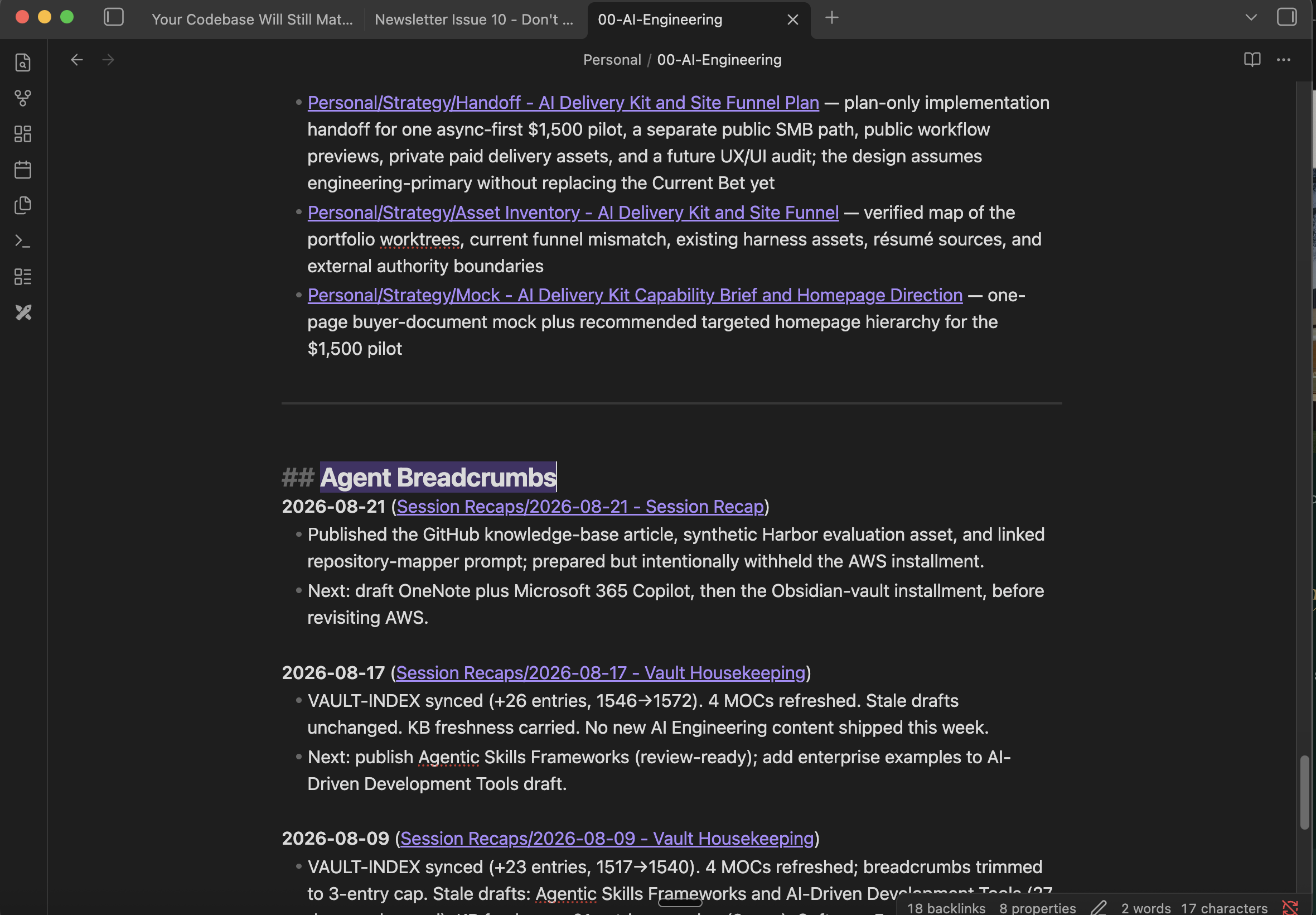
The AI Engineering topic map keeps three recent breadcrumbs. Each entry links to the full recap and leaves a next action.
Search First, Then Read
“Read my vault and help with this project” is too broad. Same issue as “read this repository”. Old plans compete with current ones, private notes enter a session that never needed them, and conflicting files can look equally authoritative.
I use a narrower sequence:
- Open the small task router or relevant topic map.
- Use
VAULT-INDEX.mdonly when the file or area can’t be located. - Search only the folders and terms named by the map.
- Open the relevant sections of source notes and recent recaps.
- Answer with file paths or edit only the approved scope.
For an article about agent skills, the agent needs the content map, related research, my earlier writing on skills, and perhaps the latest recap. It doesn’t need archived files, client notes or old product plans.
This is file-based retrieval. Filenames, links, metadata, and text search do the job that embeddings would handle in a larger system. I can inspect the path from question to source, and at my current scale the search is fast enough.
Turn Finished Work Into Shared Learning
Chat history is tied to a tool and full of intermediate discussion. I don’t want all of that to become project memory. A recap records the parts worth keeping:
# Session recap - 2026-08-24

## Completed
- Drafted article three in the knowledge-base series.

## Files changed
- `src/articles/markdown-vault-ai-context-layer.md`

## Decisions
- Keep the article focused on scoped file retrieval, not Obsidian plugins.

## Next
- Create and review the article image.
I keep file paths in the recap so the next agent can verify what changed. Completed work, decisions, and next steps have separate sections because an idea mentioned during a session shouldn’t quietly turn into a commitment.
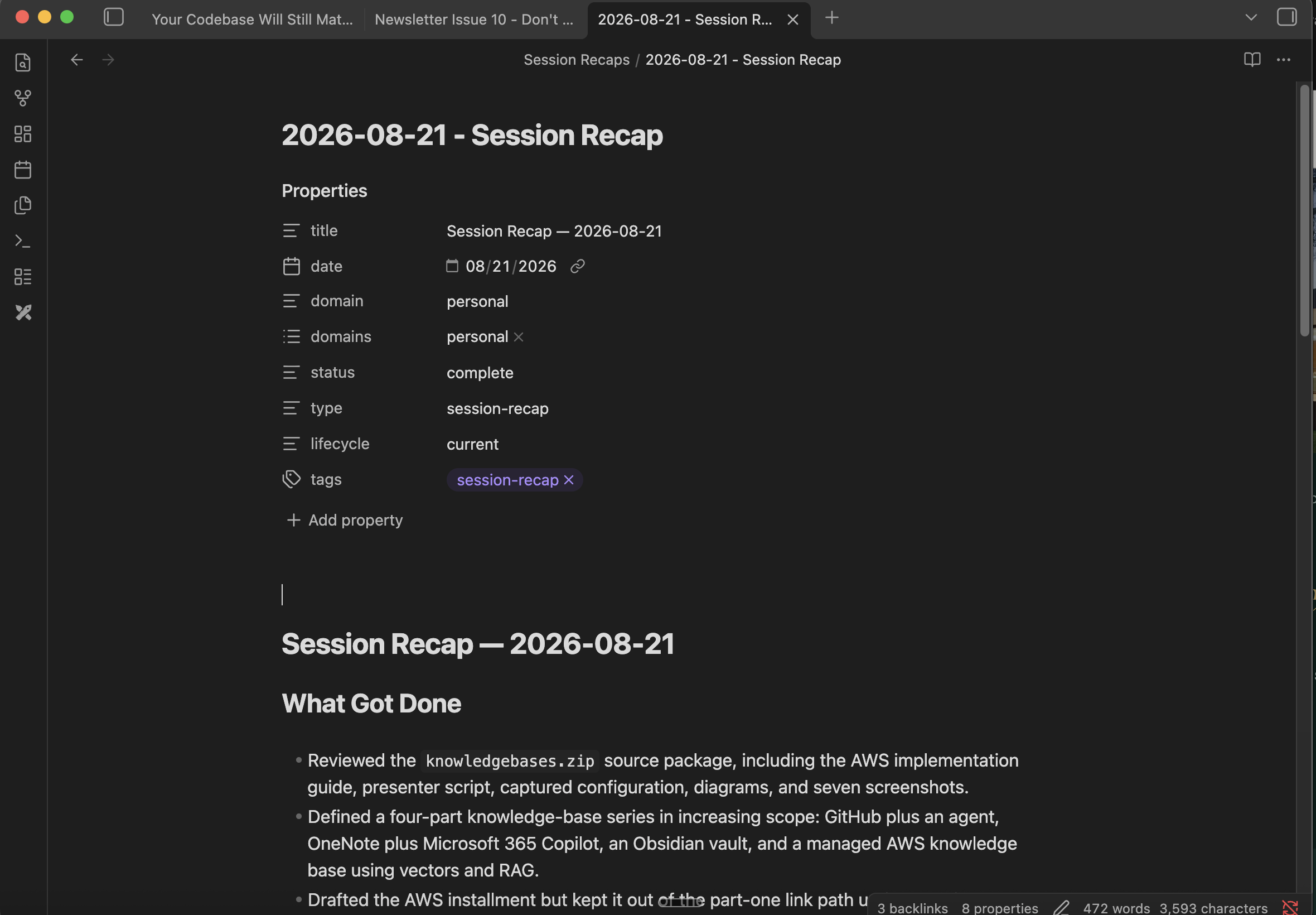
This recap sits behind the newest topic-map breadcrumb. Its metadata marks the record as current and complete.
The topic map keeps only a short breadcrumb. The full recap holds the detail.
The recap preserves the result, but the correction still needs a destination:
Missing or outdated fact → company knowledge
New strategic choice → decision record
Repeated preference → policy
Proven technique → skill
Repeatable sequence → worker
Dangerous action → mechanical gate
The full loop is:
work → correction → route → review → share → better future workFix the layer that allowed the mistake, not only the current output. Review the change before it becomes shared context.
The wrapup Skill Keeps the Vault Current
The required baseline is manual: write the recap, update the affected topic maps, refresh the index, and check navigation. I skipped a step often enough that the sequence became a wrapup skill.
The skill owns session maintenance and nothing else. It creates the recap, adds newest-first breadcrumbs, reconciles the index, and reports missing links. Its limits are explicit:
## Never Do This
- Never edit the body of a content file
- Never auto-fix a broken link; flag it for review
- Never delete a file; move it to Archive instead
- Never change priorities or status without asking first
A broken link needs review because the agent may guess the wrong destination. An obsolete-looking note moves to Archive/ instead of disappearing. Those limits keep a maintenance run from turning into an unplanned rewrite.
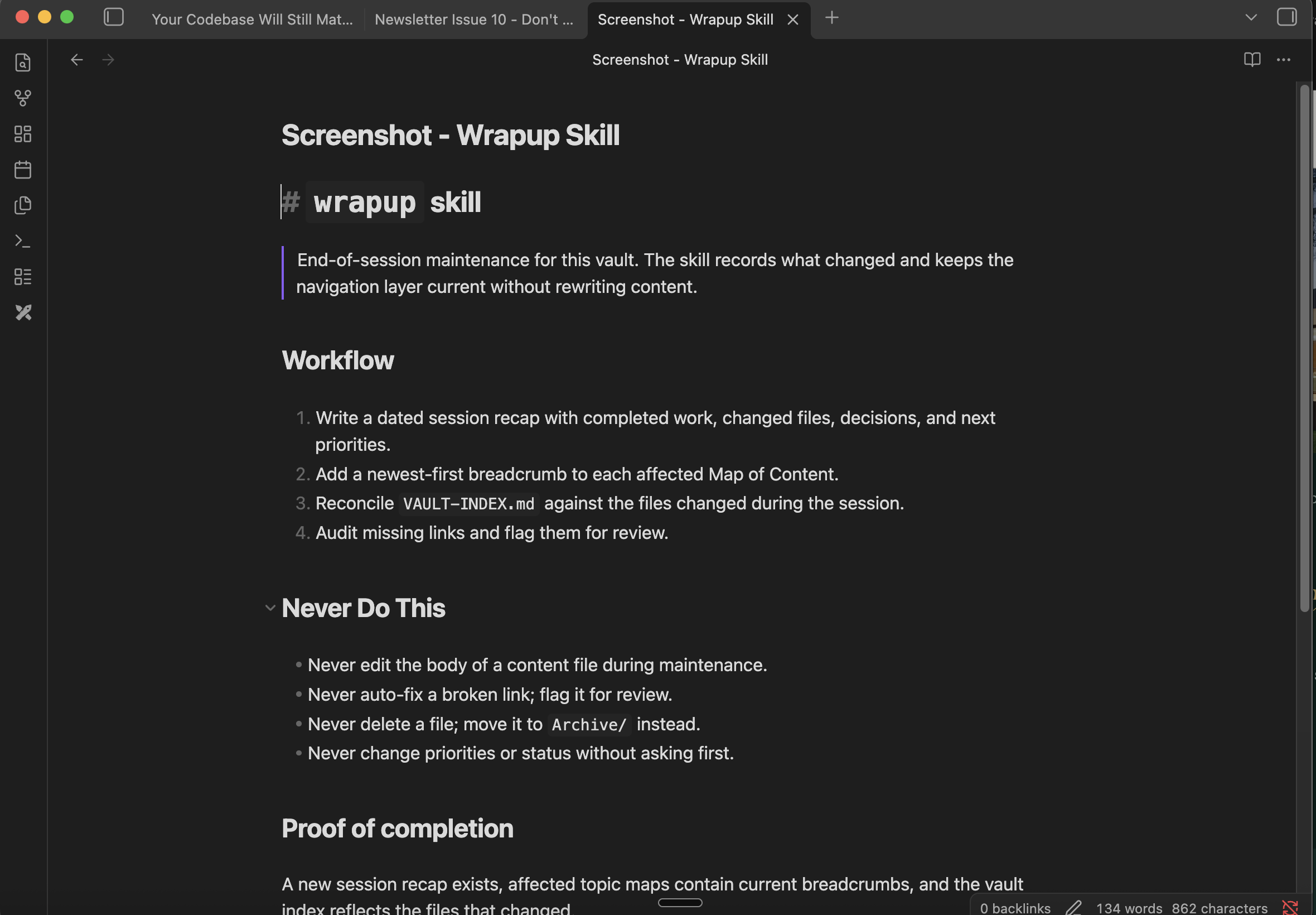
The skill updates the recap and navigation layer without changing the content underneath them.
I can inspect the new recap, topic-map breadcrumb, and index change after every run. If those files didn’t change, the skill didn’t finish.
Maintenance Is Editorial Work
A well-linked vault can still be wrong (or stale). Links show relationships but they don’t prove a claim is current or supported. This requires some upkeep.
I date time sensitive notes, mark drafts and archived material, keep source links beside the claims they support, and separate quoted evidence from my own conclusions. Contradictions get reviewed rather than resolved by whichever file the agent happens to open first.
I also keep navigation maintenance separate from content editing. A clean index doesn’t mean I’ve approved every claim underneath it.
Once the maintenance rules are stable, the optional automation is easy to schedule through Codex or Claude on a weekly basis - or run from your own cron job if you prefer to control it.
Privacy Boundaries Need to Be Structural
A local vault can contain client details, personal journals, credentials copied by mistake, or files with different confidentiality rules. Instructions telling the agent to “use the right files” don’t prevent it from reading the wrong ones.
There are several ways to manage this. Separate vaults and filesystem permissions handle material that needs real access control. Retrieval tasks can run read-only, while write access stays limited to the working folder. Sync providers and remote agents also need review before assuming local Markdown stays on the machine.
File scope also limits accidental edits. A request to improve one topic map shouldn’t become permission to rename linked files across the vault.
Test the Vault With Three Questions
I use the same checks from the first two articles.
1. Find a documented decision
Ask for one decision from a specific project. The response should state the decision and point to the file.
2. Connect the decision to later work
Ask for the current status and why it changed. The agent may need the topic map, original decision note, and recent recap.
3. Ask for something the vault doesn’t contain
Request a policy or decision that was never documented. The correct response is that the vault doesn’t support an answer.
That last question is the one I care about most. A large vault can supply plenty of related material that sounds relevant without answering the question.
When File Search Stops Being Enough
Stay with a Markdown vault while direct search finds the right sources and everyone using it can share the same file-level access. Mine may remain at this level for years.
Another retrieval layer starts to make sense when the collection becomes hard to search, users need separate access tiers, source material spans external systems, or multiple applications need the same knowledge through an API. Retrieval evaluation is another reason to move because direct search gives you little measurement beyond checking the answer yourself.
Add another retrieval layer when one of those requirements appears. A high note count alone doesn’t force you into a vector database.
A knowledge base begins acting like a company brain when it gives agents a map, preserves decisions, carries reviewed corrections forward, and makes reviewed work available to the next session.
My version still runs on ordinary Markdown files. No embeddings or vector database required.
Part four covers the managed AWS version. It adds ingestion, vector retrieval, controlled agent access, and evaluation because the requirements change.